Prismatic PowerPoint: A Template for Every Brand Story
Every presenter knows the feeling: you have a brilliant idea, a clear message, and a room full of people waiting to be convinced. Yet, the moment you open a generic, default PowerPoint template, that energy dissipates. Your sophisticated strategy is housed in a bland, uninspired box. The visual disconnect between your premium idea and your presentation’s aesthetic can quietly undermine your credibility before you even speak. This is where a thoughtfully designed system like the Prismatic PowerPoint Template transforms the experience, turning your slides from a mere backdrop into an active participant in your storytelling.
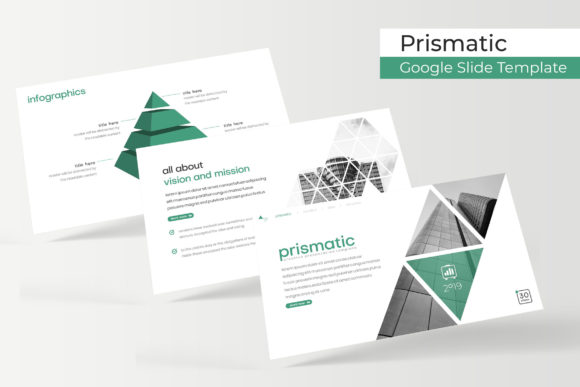
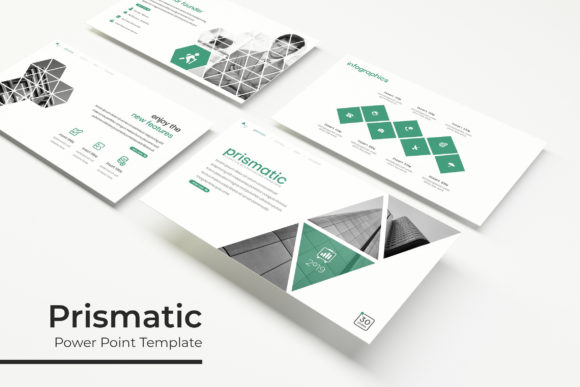
Prismatic is not just a collection of pretty slides; it’s a comprehensive design ecosystem built for clarity and impact. At its core, it offers 150+ total slides, meticulously organized across five premade color themes. Each color variation—whether you choose a vibrant palette or a more subdued corporate tone—contains 30 dedicated slides. This structure provides immediate visual consistency, ensuring that your brand’s color story is seamlessly woven throughout your entire presentation. The handcrafted infographics are a particular standout, translating complex data into clear, engaging visual narratives that audiences can grasp instantly. For those pivotal moments in a presentation, the included section break slides create natural pauses, helping to organize your talk and maintain audience attention. Meanwhile, the gallery and portfolio slides offer elegant frameworks to showcase work, products, or case studies with the visual weight they deserve.
Beyond the Slide Deck: A Foundation for Visual Identity
The true power of a premium asset like this lies in its versatility as a foundational design tool. Consider the entrepreneur building a brand from the ground up. The five premade color themes aren’t just for presentations; they become the starting point for a entire brand color palette. The clean, modern typography and pixel-perfect illustrations set a visual tone that can inform logo design concepts, packaging layouts, and social media graphics. The consistent visual language established within the template ensures that whether a potential customer encounters your brand in a pitch deck, on an Instagram story, or on your website, they receive a coherent and professional experience. This consistency is the bedrock of brand recognition.
For the small business owner or content creator, practicality is paramount. The drag-and-drop, resizable, and editable graphic placeholders are a game-changer. You’re not locked into a rigid design; you can adapt layouts to fit your unique content. Need to swap a placeholder image for a photo of your latest product? The master slide structure ensures that design elements remain aligned and professional, saving hours of fiddling and formatting. This level of editability means the template grows with your business, adaptable for a quarterly investor update, a product launch social media campaign, or an internal team workshop.
Practical Applications for Marketers and Creatives
Let’s move from theory to practice. How does a toolkit like Prismatic solve real-world problems for a marketing professional or a creative entrepreneur?
- Client Pitches and Proposals: Transform a standard proposal into an interactive experience. Use the portfolio slides to showcase past successes with impact, and the data visualization slides to present market research with undeniable clarity.
- Social Media Content Creation: The template is a hidden gem for social media managers. The section break slides can be adapted into striking quote graphics or announcement posts. The infographic elements can be broken down into carousel posts that educate your audience, driving engagement and shares.
- Internal Communications and Training: Ditch the monotonous training manuals. Create dynamic onboarding presentations, workshop decks, or quarterly business reviews that keep teams informed and engaged. The clean design reduces cognitive load, making information easier to absorb and remember.
- Digital Products and Course Materials: For educators and online creators, the professional polish of the Prismatic slides elevates the perceived value of your digital products. Use it to design course modules, webinar slides, or downloadable workbooks that feel premium and trustworthy.
The inclusion of a readme file and links to free fonts used is a thoughtful touch that speaks to the designer’s understanding of workflow. It removes the common frustration of missing fonts and ensures your final output looks exactly as intended. This attention to detail is what separates a merely functional template from a truly professional design asset.
Making It Your Own: A Guide to Effective Use
Having a powerful template is one thing; wielding it effectively is another. Here’s how to ensure you get the most out of this resource:
- Start with Your Brand, Not the Template. Before you open the file, have your brand colors, logo, and key imagery ready. Then, select the premade color theme that best aligns with your brand identity. This ensures the template adapts to you, not the other way around.
- Embrace the Master Slides. Take thirty minutes to explore the master slide view. Understanding how the layouts are built will empower you to make global changes efficiently and create custom slides that still feel cohesive.
- Pair with Intention. While the template provides a strong typographic foundation, consider how you might pair it with your existing brand fonts. For example, use the template’s clean sans-serif for body text and pair it with your distinctive display font for headlines to create a unique blend.
- Focus on Readability. The most beautiful design fails if your message is lost. Use the clear hierarchy provided in the templates to guide your audience’s eye. Break up text, leverage the infographics to explain concepts visually, and don’t be afraid of white space.
In a digital landscape saturated with content, the quality of your visual communication is a direct reflection of the quality of your ideas. A resource like the Prismatic PowerPoint Template is more than a slide deck; it’s a system for presenting information with authority, clarity, and undeniable style. It provides the structure so you can focus on the substance, ensuring that your next presentation doesn’t just share information, but makes a lasting impression.