Mastering Your Message: The Outline PowerPoint Template
Imagine you have thirty minutes to pitch your life’s work to a room full of potential investors, or perhaps you are the keynote speaker at a niche industry conference. The pressure is on, and you open your laptop only to stare at a blank PowerPoint slide. That blinking cursor on a white background is often the enemy of productivity. We have all been there, spending hours adjusting text boxes, aligning images, and fiddling with color palettes only to end up with a disjointed mess that looks like a high school science project. This is where the visual architecture of a presentation becomes just as critical as the content itself. If your slides look amateurish, your audience subconsciously questions the quality of your ideas. This is the exact problem the Outline Power Point Template was designed to solve, offering a robust framework of over 150 total slides that takes the guesswork out of professional design.
A Visual Language for Modern Brands
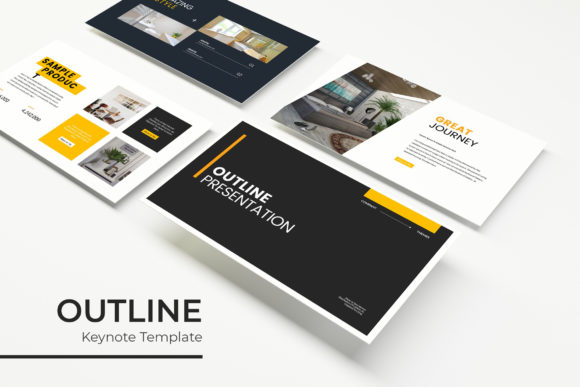
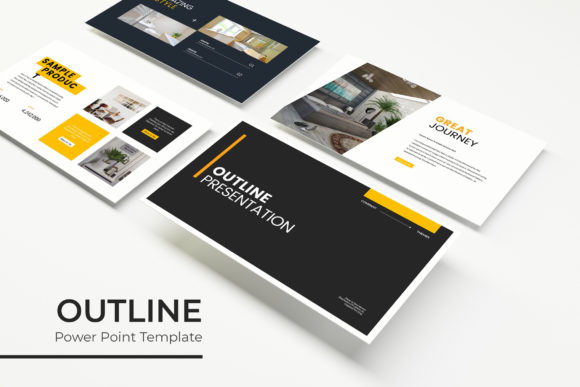
The core appeal of this template collection lies in its versatility and its refusal to be a "one-size-fits-all" generic solution. When we talk about brand identity, consistency is the golden rule. Whether you are a small business owner putting together a quarterly report or a content creator pitching a collaboration to a sponsor, your visual language needs to be cohesive. The Outline PowerPoint Template achieves this through its unique "outline" aesthetic—a clean, contemporary look that feels airy and modern without sacrificing structure. It bridges the gap between modern typography and functional graphic design, ensuring that your slides look like they were custom-made by a professional agency.
What makes this package particularly practical for busy professionals is the inclusion of five premade color themes. We all know that choosing colors can be paralyzing. Do you go with a vibrant orange to show energy, or a deep navy to convey trust? By providing 30 distinct slides for each of the five color variations, the template allows you to instantly match your presentation to your specific brand identity or the mood of your project. If you are a wellness brand, you might lean into the softer, earth-toned palette. If you are a marketing professional launching a tech product, the high-contrast, vibrant variations might be your go-to. This level of customization ensures that your presentation is not just a collection of slides, but a cohesive narrative extension of your brand.
Beyond Slides: A Toolkit for Visual Storytelling
While the primary function is presenting, the utility of the Outline PowerPoint Template extends far beyond the conference room. Think of these assets as a modular design toolkit. The pixel-perfect illustrations and handcrafted infographics included in the files are high-quality vector graphics. For a graphic designer or creative entrepreneur, this is a goldmine. You can easily export specific elements for use in other contexts. Need a quick infographic for a blog post? The data visualization slides are already laid out for you. Creating a social media carousel for Instagram or LinkedIn? You can simply screenshot or export individual slides to create a seamless, scrollable narrative for your feed.
The versatility of these assets is a massive time-saver. Consider the needs of a freelancer creating marketing assets for a client. Instead of building charts from scratch in Photoshop or Illustrator, you can manipulate the existing data-driven graphics within PowerPoint. The gallery and portfolio slides are particularly useful for visual artists, photographers, or interior designers. These layouts are designed to frame your work beautifully, using the "outline" style to draw the eye toward the imagery rather than distracting it with heavy borders or cluttered backgrounds. It allows the work to breathe, which is essential for editorial design and portfolio presentations.
Technical Fluidity: Drag, Drop, and Resize
One of the most frustrating aspects of using standard PowerPoint templates is the rigidity of the elements. You try to move a text box, and the whole layout shifts. You try to resize a logo, and it distorts. This template is built on a foundation of Master Slides, which is the industry standard for high-functioning presentation design. This means the underlying structure is solid, but the surface elements are incredibly flexible.
The resizable and editable graphics combined with picture placeholders make the workflow intuitive. If you have a team member who isn't design-savvy, they can still produce a polished presentation. The drag & drop functionality allows you to swap out images instantly without breaking the layout. This is crucial for fast-paced environments where content changes at the last minute. Imagine you are a real estate agent updating a property listing presentation. You can swap out photos of the house, update the square footage figures using the pre-designed infographics, and adjust the color scheme to match the agency’s branding in a matter of minutes, not hours. This fluidity turns PowerPoint from a design tool into a communication tool.
Strategic Design for Audience Engagement
Visual consistency does more than just make things look pretty; it builds trust. Psychologically, when an audience sees a consistent design language—uniform fonts, consistent spacing, and harmonious color palettes—they perceive the presenter as more organized and credible. The Outline Power Point Template facilitates this through its structured approach to layout. The use of section break slides is a particularly smart feature. In long-form presentations, attention spans wander. These distinct breaks act as visual palate cleansers, signaling to the audience that you are moving to a new topic, which helps reset their focus.
Furthermore, the template addresses the critical issue of readability. Too often, presenters crowd their slides with text, turning the screen into a teleprompter. The "Outline" style inherently encourages a more minimal, breathable approach. It prioritizes key data points and visual hierarchy. For educators or trainers, this means your students can actually absorb the information rather than frantically copying notes. For sales teams, it means the audience is looking at you, the storyteller, rather than reading ahead on the slide. By improving readability and reducing cognitive load, you significantly increase audience engagement.
Practical Implementation and Workflow
Getting started with a complex template can sometimes feel daunting, but the inclusion of a "Readme First" file and clear documentation indicates a user-centric approach. It is always recommended to start by reviewing the Master Slides. Familiarize yourself with the available layouts before you start building. Are you presenting a timeline? Check the infographic section. Are you introducing a team? Look for the profile layouts. By planning your content to fit the existing structure, you save immense amounts of time.
Another practical tip is to leverage the font pairing suggestions often found in high-quality templates. Typography is the voice of your design. While the template comes with specific font recommendations (and links to free downloads), you can also explore premium fonts to further customize the look. If you are working on a luxury brand presentation, swapping the sans-serif for an elegant serif font can change the entire vibe from corporate to sophisticated. Conversely, sticking with a clean sans serif keeps the look modern and tech-forward. The template provides the canvas; your typography choices provide the personality.
Ultimately, the goal of any presentation design is to remove friction between your idea and your audience's understanding. By utilizing a robust system like the Outline Power Point Template, you are not just buying slides; you are buying back your time. You are eliminating the anxiety of alignment and the guesswork of color theory. Whether you are a blogger expanding into video content, a startup founder seeking funding, or a corporate manager streamlining internal communications, having a reliable, visually striking, and technically sound template is an investment in clarity and professionalism. It ensures that when you open that laptop to present, you are ready to tell your story, beautifully and effectively.