Sushiteru PowerPoint Template: A Design Asset for Your Brand
There’s a moment in every presentation where you realize the slides are working against you. The layout feels cluttered, the colors clash, and the graphics look like an afterthought. It’s a common frustration, especially when you’re trying to communicate a clear message or pitch a new idea. The Sushiteru PowerPoint Template aims to eliminate that friction, offering a structured yet flexible foundation that lets your content take center stage. It’s not just a set of slides; it’s a toolkit designed for visual consistency and professional polish.
Beyond Basic Slides: Understanding the Visual Appeal
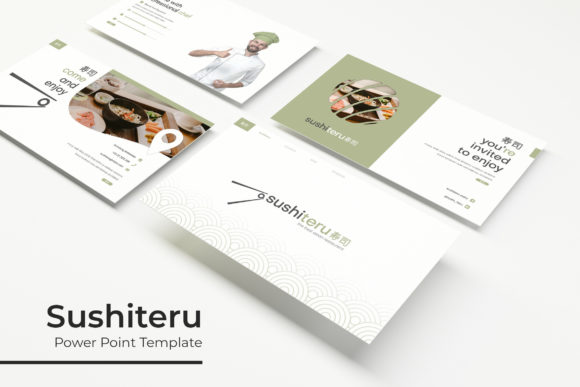
At first glance, what stands out about the Sushiteru PowerPoint Template is its clean, modern aesthetic. It avoids the overused corporate clip art and garish color schemes that plague many default templates. Instead, it leans into a balanced design language with ample white space, thoughtful typography, and a cohesive visual system. The 150+ total slides aren’t just duplicates; they’re a curated collection covering section breaks, gallery layouts, portfolio showcases, and data-driven infographics. Each slide is crafted on master slides, ensuring pixel-perfect alignment and making global changes a breeze. The handcrafted infographics, in particular, are a standout feature, transforming complex data into engaging visual stories without requiring advanced design skills.
The practical value of this structure is immense. For a small business owner preparing a quarterly review, it means spending less time aligning boxes and more time refining the narrative. For a marketer creating a client pitch, it provides a professional canvas that elevates the brand’s credibility. The inclusion of picture placeholders that support drag-and-drop functionality streamlines the process of adding imagery, making it accessible even for those who aren’t PowerPoint experts. This focus on usability is what separates a premium template from a basic one—it’s built for real-world use, not just for looking good in a preview.
Practical Applications for Creative Professionals
The true test of any design asset is its versatility. The Sushiteru PowerPoint Template’s five premade color variations—each with 30 dedicated slides—offer a straightforward way to adapt the presentation to different brand guidelines or project moods. Need a sleek, dark-themed pitch for a tech startup? There’s a color scheme for that. Working on a vibrant, energetic presentation for a lifestyle brand? Another variation fits the bill. This adaptability makes it a valuable tool across numerous scenarios.
Consider its use in **branding** and **logo design** presentations. You can use the portfolio slides to showcase logo concepts in context, or the gallery slides to present mood boards and brand style guides. For **packaging design**, the template’s clean layouts provide a perfect stage to mock up product packaging, allowing clients to visualize the final product. The infographic slides are ideal for illustrating market research, competitive analysis, or the story behind a new product line.
For **social media graphics** and **web design**, the template serves as a brilliant planning tool. Use it to map out a social media content calendar, presenting visual plans for Instagram grids or Facebook ad campaigns. Web designers can utilize the slides to present wireframes, site maps, and user flow diagrams in a cohesive, client-friendly format. The resizable and editable graphics ensure that every element, from icons to charts, can be customized to match the exact brand identity you’re building.
Beyond digital, the template’s high-quality design translates well into **print materials**. Create presentation decks that will be converted into **PDF handouts** for conferences, or design **poster** layouts for events. The consistent styling ensures that your printed materials look just as polished as your digital ones, reinforcing brand recognition across all touchpoints. It’s a bridge between your on-screen ideas and tangible, professional outputs.
Integrating Typography for Maximum Impact
While the Sushiteru PowerPoint Template provides a robust visual framework, the final touch that often defines its success is typography. The template notes that it includes a readme file with links to the free fonts used in the preview. This is a critical detail. Using the recommended **display font** or **serif font** ensures that the text hierarchy and overall aesthetic remain intact, preserving the designer’s original intent. However, the real power comes from understanding how to adapt it.
If you’re aligning the presentation with an existing brand, you may need to swap the fonts. This is where font pairing becomes essential. The template’s clean layout likely pairs well with a strong **sans serif font** for body text, ensuring **readability**, and a complementary **script font** or **handwritten font** for accent headings to add personality. The key is to maintain contrast and hierarchy without creating visual chaos. Test your chosen **typeface** on a few slides first—check its legibility at different sizes, especially in charts and bullet points.
For **editorial layouts** or **digital products** like e-books presented in slide format, typography dictates the reading experience. A modern, minimalist **sans serif font** might work best for a tech-focused report, while a elegant **serif font** could suit a more traditional industry analysis. The goal is to choose fonts that not only look good but also serve the content’s purpose, enhancing **professional presentation** and keeping your audience engaged from the first slide to the last.
Making the Template Your Own
A common pitfall with premium templates is using them straight out of the box. The Sushiteru PowerPoint Template is designed to be a starting point, not a finished product. The included PPTX files are fully editable, which means you should feel empowered to adjust color palettes, modify layouts, and even combine elements from different slides to create a unique presentation flow. The master slide feature is your best friend here—make changes to the master, and they’ll propagate throughout, saving you hours of manual work.
Think about the specific needs of your project. Are you creating a **marketing asset** for a product launch? Use the section break slides to build anticipation and clearly delineate phases of the campaign. Are you designing a **portfolio** for a creative agency? Leverage the gallery slides to create a visually stunning showcase of your work, ensuring each project gets the space and attention it deserves. The template’s structure is a guide, but your content and creative direction are what will make it memorable.
Finally, a note on licensing and usage. The template itself comes with its own license terms, typically allowing for use in commercial projects, but it’s always wise to review the included readme file. The fonts used are free for commercial use, but it’s a good practice to double-check the specific licenses of any additional fonts you incorporate. This due diligence ensures that your final presentation, whether it’s for an internal meeting or a public-facing **merchandise** pitch, is fully compliant and professional.
In the end, a tool like the Sushiteru PowerPoint Template is about reducing barriers. It gives you a professional foundation so you can focus on what truly matters: your message, your story, and your connection with the audience. It’s a practical asset for anyone who needs to communicate ideas with clarity and style, from entrepreneurs to seasoned designers.