Dexterus PowerPoint Template: Your Toolkit for Visual Storytelling
That moment of dread when you open a blank slide, cursor blinking back at you, is familiar to anyone who's ever had to pitch an idea, present a report, or launch a brand. You know the content is solid, but making it look polished, consistent, and engaging feels like a separate, daunting project. This is where a thoughtfully crafted presentation template transitions from a nice-to-have to a genuine productivity tool. The Dexterus PowerPoint Template is built specifically to bridge that gap, offering a structured yet flexible foundation that lets your ideas take center stage without the design anxiety.
More Than Slides: A Visual Identity System
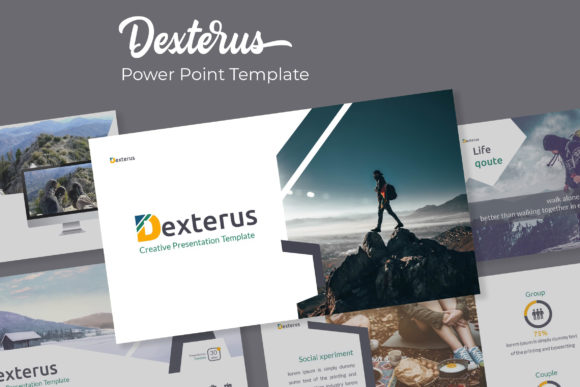
What sets a resource like Dexterus apart is its understanding that a presentation is a core piece of brand communication. It's not just a collection of charts and bullet points; it's a visual narrative. With 150+ total slides organized across five premade color schemes, it functions less like a template and more like a mini design system. Each of the five color variations delivers 30 unique slides, meaning you get substantial variety without sacrificing cohesion. This approach is invaluable for small businesses, freelancers, or marketing teams who need to maintain a consistent brand identity across multiple presentations, pitches, or internal decks. The color palettes aren't random; they're curated to evoke specific moods—whether you're aiming for corporate clarity, creative energy, or minimalist elegance.
The real power lies in the handcrafted infographics and section break slides. Instead of struggling to build a timeline or process diagram from scratch, you have a library of editable, visually appealing components at your fingertips. These elements are designed to communicate complex information quickly and beautifully, which is essential for keeping an audience engaged. Whether you're illustrating a marketing funnel, a project roadmap, or data comparisons, these infographics provide a professional starting point that you can adapt to your exact data. Similarly, the gallery and portfolio slides offer clean layouts to showcase work, products, or case studies, turning a standard presentation into a compelling visual portfolio.
Practicality Built into Every Click
A template's design is only half the story; its usability determines its real-world value. This is where the Dexterus template's technical foundation shines. Being based on Master Slides means that making global changes—like updating a company logo, adjusting a color accent, or modifying a font—is a matter of editing the master once, and the change cascades throughout the entire file. This saves immense time and eliminates the inconsistency that often plagues presentations edited by multiple people.
The inclusion of resizable and editable graphic placeholders with drag-and-drop functionality is a game-changer for non-designers. You can swap in your own images without worrying about breaking the layout or struggling with alignment. The pixel-perfect illustrations ensure that every visual element, from icons to decorative accents, looks crisp on any screen, from a laptop to a large projector display. This attention to detail elevates the overall quality of your presentation, making it look custom-designed rather than assembled from generic parts.
From Presentations to Broader Brand Applications
While its primary function is for PowerPoint, the assets within a high-quality template like this have creative utility that extends far beyond slide decks. Think of the individual slide layouts as design blueprints. The clean, structured grids for text and images can inspire or be directly adapted for other projects. A well-designed quote slide can become the basis for a social media graphic. The typography hierarchies and spacing used in the slides can inform your approach to editorial layouts or website design. The color schemes and visual style provide a ready-made palette for developing brand identity elements, from digital ads to print materials.
For entrepreneurs and content creators, this kind of resource is a force multiplier. The consistent visual language it provides can be threaded through your entire digital presence. Use the same color story and design motifs in your presentation, your Instagram posts, your blog graphics, and your marketing one-pagers. This builds brand recognition and professionalism. The included portfolio slides are perfect for freelancers to showcase work to potential clients, while the infographics are ideal for marketers creating reports or bloggers breaking down complex topics for their audience.
Maximizing Your Template: A Few Pro Tips
To get the most out of a comprehensive template, a little strategic planning goes a long way. First, choose your color variation intentionally. Don't just pick your favorite color; select the palette that best aligns with your brand's personality and the presentation's goal. Is it a serious financial report? A vibrant creative pitch? Let the color do some of the communicative work for you.
Next, treat the typography as a starting point, not a final destination. The template will include suggested font pairings, but always test them with your own content. Readability is paramount. Ensure body text is legible at a comfortable viewing distance and that headlines have enough contrast to stand out. If the included fonts don't quite match your brand's voice, swap them out—but do so consistently. Use the Master Slides to make this change globally to maintain that hard-won visual consistency.
Finally, think modularly. You don't have to use the slides in the order they're given. Build a library of your most-used layouts—the agenda slide, the team bio slide, the key takeaway slide—and mix and match them across different presentations. This modular approach saves time and reinforces your brand's visual framework with every new document you create. The "Readme First" file included with the download is worth a quick scan; it often contains specific instructions or notes about font usage that can streamline your workflow.
In the end, a tool like the Dexterus PowerPoint Template is about removing barriers. It handles the heavy lifting of design structure, consistency, and visual appeal, freeing you to focus on what truly matters: your message, your story, and your connection with the audience. It’s a practical asset for anyone who needs to communicate ideas with clarity and visual impact, time and time again.