Unlocking Visual Storytelling with the Six Keynote Template
Crafting a presentation that captivates an audience and clearly communicates your message is a common challenge for professionals, entrepreneurs, and creatives alike. It’s not just about having good information; it’s about presenting that information in a visually cohesive, engaging, and professional manner. This is where a thoughtfully designed tool can transform your workflow. The Six Keynote Template offers a robust foundation for building stunning presentations, but its utility and visual philosophy extend far beyond the realm of slide decks. Understanding its core features reveals a versatile asset for anyone serious about elevating their brand's visual communication.
A Foundation of Flexibility and Polish
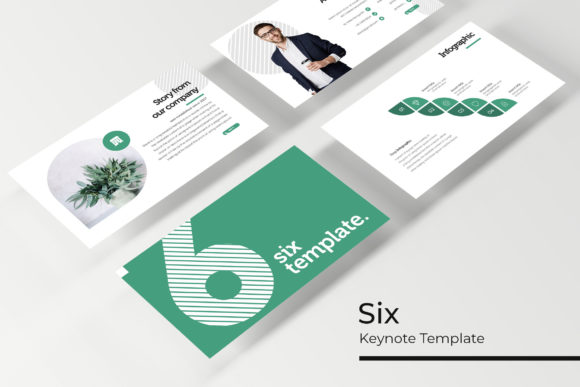
At its heart, the Six Keynote Template is built on principles of efficiency and aesthetic excellence. The package includes 150+ total slides, meticulously organized across five premade color variations. Each color theme provides 30 distinct slides, ensuring you have a vast library of layouts for any narrative need—be it a data-driven quarterly review, a compelling product launch story, or a creative portfolio showcase. The inclusion of section break slides and dedicated gallery and portfolio slides demonstrates a deep understanding of how to structure a presentation for maximum impact and flow.
What truly sets this resource apart is its commitment to pixel-perfect design and user-centric functionality. Every element is crafted with precision, resulting in clean lines, balanced compositions, and professional typography that immediately elevates the perceived quality of your work. The master slide architecture is the engine behind this consistency. By building your presentation on these master slides, you ensure that every new slide you create inherits the foundational design language, guaranteeing visual harmony throughout your deck. This isn't just about looking good; it's about building a reliable system for your visual identity.
Beyond Slides: A Toolkit for Brand Consistency
While the primary function is presentation design, the components within the Six Keynote Template serve as a powerful starter kit for broader branding and design projects. The handcrafted infographics are particularly valuable. Instead of using generic clip art, you can leverage these custom-designed charts, graphs, and diagrams to illustrate complex processes, statistics, or timelines in reports, whitepapers, or website content. The resizable and editable graphics, combined with intuitive picture placeholders that support drag & drop functionality, make it incredibly simple to integrate your own photography and brand assets.
Consider the practical applications for a small business owner or a content creator. The color palettes provided are not arbitrary; they are curated to work in harmony, offering a ready-made starting point for developing a cohesive brand color scheme. You can extract the hex codes from the template and apply them to your website, social media graphics, and print materials, ensuring a unified look across all touchpoints. The clean, modern aesthetic of the slides translates beautifully to other formats. The layout principles used for a "team" slide can inspire the design of an "about us" page on your website. The structure of a "process" slide can be adapted into an infographic for a blog post or a printable guide for your customers.
Practical Workflow and Considerations
Integrating this template into your creative process is straightforward, but a few practical considerations will help you get the most out of it. The first step is to choose the color variation that best aligns with your existing brand identity or the mood you wish to convey. Once selected, dive into the master slides. Customizing these first—adjusting the global font styles, logo placement, and primary color accents—will save you countless hours later, as every subsequent slide will reflect these core choices.
Font pairing is a critical aspect of visual communication. The template likely uses a harmonious combination of a serif and a sans-serif font, or perhaps a modern sans-serif with a complementary script accent. When you integrate your own brand fonts, test them thoroughly within the template's layouts. Ensure that your chosen typeface maintains readability at various sizes, especially for body text and data labels within infographics. The goal is to enhance clarity, not to distract with overly decorative lettering.
From a commercial standpoint, it's essential to verify the licensing terms associated with the template. Most premium assets like this come with a license that permits use in personal and commercial projects, but restrictions may apply regarding resale or redistribution of the template files themselves. Always review the included readme file to understand your rights fully. This due diligence protects your work and ensures you're using the asset correctly.
Elevating Your Visual Narrative
The true value of a resource like the Six Keynote Template lies in its ability to streamline the creation of professional-grade visuals, allowing you to focus on your message and strategy. For a marketing professional, it means faster turnaround on polished campaign decks. For a startup founder, it means presenting a credible, investment-ready face to the world. For a designer or creative entrepreneur, it's a time-saving foundation that can be adapted into social media templates, digital product mockups, or client proposal layouts.
By providing a structured yet flexible system—complete with master slides, editable graphics, and thoughtful color schemes—it removes the friction from the design process. The result is not just a better presentation, but a more consistent and recognizable brand identity. It empowers you to communicate with the visual sophistication that today's audiences expect, turning complex ideas into clear, engaging stories that resonate and drive action. In the end, the most powerful tool is one that feels invisible, allowing your ideas to take center stage with clarity and style.