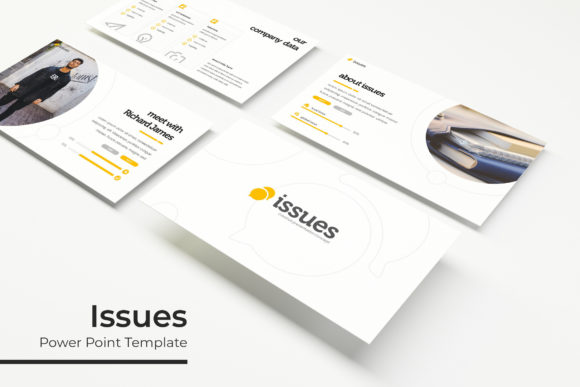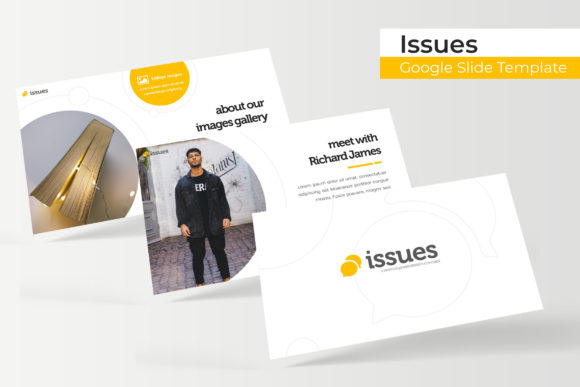
Streamline Your Visual Storytelling with the Issues Google Slide Template
Staring at a blank slide deck can feel paralyzing, especially when the content itself is complex or technical. For professionals ranging from educators to corporate strategists, the challenge isn't just presenting data; it is presenting it in a way that maintains audience engagement. This is where the specific design choices within the Issues Google Slide Template come into play. Rather than a generic collection of placeholders, this package is built on the premise that structure aids comprehension. It offers a robust framework of over 150 slides, designed to handle everything from intricate data visualization to broad brand storytelling, ensuring that your message is not lost in a sea of cluttered graphics.
A Foundation Built on Flexibility and Color Psychology
One of the standout characteristics of this collection is its approach to color theory and layout adaptability. The package includes five distinct premade color variations, with 30 dedicated slides for each template. This isn't just about aesthetic preference; it is about aligning your presentation with your specific brand identity or the psychological tone of your content. Whether you are preparing a corporate quarterly review that requires a conservative blue palette or a startup pitch deck that demands a vibrant, energetic hue, the infrastructure is already there.
The reliance on Master Slides ensures that changes propagate smoothly throughout the document. This feature is critical for maintaining visual consistency. If you have ever tried to manually update a logo or font style across 50 individual slides, you understand the value of a pixel-perfect, centralized design system. The Issues Google Slide Template eliminates the tedious aspects of formatting, allowing you to focus on the narrative arc of your presentation.
Practical Applications for Modern Professionals
While slide decks are traditionally associated with boardrooms, the utility of a high-quality template extends far beyond quarterly reports. The versatility of the Issues Google Slide Template makes it a valuable asset for various professional scenarios.
- Brand Guidelines & Manuals: Use the gallery and portfolio slides to showcase visual assets, typography pairings, and color codes. The clean layouts provide the perfect canvas for a brand identity guide.
- Marketing Campaign Pitches: Marketers can utilize the handcrafted infographics to break down audience demographics, conversion funnels, and ROI projections. Visualizing data helps in persuading stakeholders who may not be fluent in raw analytics.
- Educational Workshops: For trainers and educators, the section break slides act as visual pauses, helping learners compartmentalize information. The logical flow of the template aids in readability and information retention.
- Product Launches: Entrepreneurs can leverage the picture placeholders to create a "lookbook" style presentation. The drag-and-drop functionality allows for rapid prototyping of how product images interact with text.
Furthermore, the widescreen format is optimized for modern displays, ensuring that your content looks sharp whether projected on a conference room screen or viewed on a laptop. The pixel-perfect illustrations included in the deck add a layer of professionalism that stock photos often fail to achieve.
Streamlining the Workflow: Features That Save Time
Design efficiency is often the difference between a project launched on time and one stuck in revision hell. The Issues Google Slide Template addresses common bottlenecks with specific functional features. The resizable and editable graphic elements mean that you are not locked into a rigid structure. If a particular diagram takes up too much space, you can scale it down without losing resolution quality.
The inclusion of picture placeholders is perhaps the most user-friendly feature for non-designers. Instead of trying to crop and fit images manually—a process that often leads to awkward aspect ratios—you simply drag your image into the designated area. The template handles the cropping and masking automatically. This ensures that even if you lack advanced skills in presentation software, the final output looks pixel-perfect and polished.
Technical Considerations and Asset Management
When investing in design assets, understanding what is included is crucial for project planning. The Issues Google Slide Template comes equipped with everything you need to start immediately. It includes 5 PPTX files and 5 PPTX Widescreen files, ensuring compatibility with both Google Slides and PowerPoint environments. This cross-compatibility is vital for teams that may use different software ecosystems.
Typography is a key component of the design. The template utilizes free fonts, and a Readme First file is included with direct download links. This eliminates the frustration of opening a file only to find that the fonts have defaulted to Times New Roman because the specific typeface wasn't installed. By sticking to free fonts, the template also ensures there are no hidden licensing costs for your typography, a common pitfall when using premium fonts without proper licensing.
It is important to note that while the Issues Google Slide Template provides the structural framework and infographics, the photographs used in the preview are for illustration purposes only. This is standard practice in the industry, allowing you to insert your own high-resolution, relevant imagery rather than relying on generic stock photos. This approach actually strengthens your brand identity, as the visuals will be unique to your business.
Elevating Communication Through Design
Ultimately, a presentation is a tool for communication. Whether you are a graphic designer presenting a logo concept to a client, a small business owner outlining a growth strategy, or a content creator sharing a media kit, the medium affects the message. A cluttered, amateurish layout can subconsciously undermine your credibility, regardless of how good the content is.
By utilizing a structured system like the Issues Google Slide Template, you are borrowing the principles of professional presentation design—hierarchy, spacing, and balance. The section break slides help control the pacing of your delivery, while the infographics translate complex numbers into understandable visual stories. In a world where attention spans are short, having a visually appealing and logically structured deck is no longer a luxury; it is a necessity for effective visual communication