Master Your Next Pitch with the Six Google Slide Template
Staring at a blank presentation screen can be paralyzing. You have the data, the strategy, and the vision, but the visual execution often feels like a roadblock. Whether you are a startup founder pitching to investors, a marketer presenting a quarterly review, or a creative agency showcasing a portfolio, the visual medium through which you communicate is just as critical as the words you speak. This is where the right design assets come into play, transforming a mundane slideshow into a compelling narrative. The Six Google Slide Template isn't just a collection of slides; it is a comprehensive visual toolkit designed to bridge the gap between your ideas and a polished, professional reality.
A Visual System Built for Modern Professionals
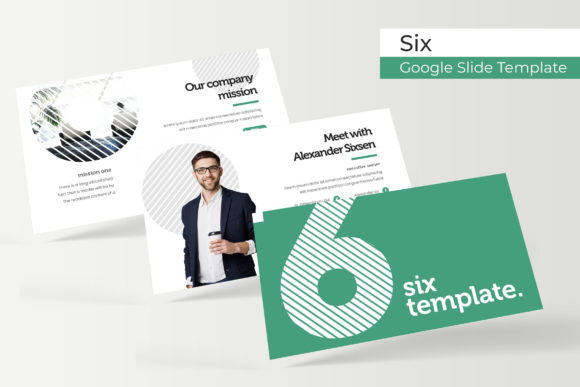
What sets this collection apart from the thousands of generic templates available online is its dedication to variety and cohesion. The package includes 150+ total slides, but the real value lies in the structure. It is built on the premise that one size does not fit all. With six distinct templates included, you are equipped to handle different moods, industries, and message types without ever feeling repetitive. The system offers five premade color schemes for each template, giving you a total of thirty unique visual variations right out of the box.
For the design-conscious professional, the aesthetic quality is paramount. These are not merely functional layouts; they feature pixel-perfect illustrations and handcrafted infographics. We know that data visualization is often the hardest part of a presentation to get right. A bar chart in Excel looks sterile, but a custom-designed infographic within these slides adds context and professionalism to your numbers. The typography and spacing have been carefully considered to ensure that your content breathes, making it easier for your audience to digest complex information.
Streamlining Your Workflow: Efficiency Meets Elegance
Time is the one resource none of us can manufacture. If you are a small business owner or a busy creative, spending hours nudging text boxes and aligning images is a waste of your billable time. The Six Google Slide Template addresses this through a strict adherence to efficiency tools. The entire collection is based on Master Slides. This means that if you want to change a global element—like the position of a logo or the font style of a header—you can do it once in the master view, and it will update across all relevant slides instantly.
Furthermore, the user experience has been prioritized with resizable and editable graphic picture placeholders. Gone are the days of struggling to crop an image to fit a specific shape. With the drag-and-drop functionality, you simply select your image, drag it over the placeholder, and drop it. The template handles the cropping and sizing automatically. This feature is invaluable for creating portfolio slides or gallery sections where visual consistency is key. Whether you are a photographer, a real estate agent, or a product designer, maintaining the aspect ratio of your visuals ensures that your work looks professional, not distorted.
Practical Applications: Beyond the Boardroom
While "Google Slide Template" suggests a business meeting, the versatility of this asset extends far beyond corporate presentations. Think of these layouts as a dynamic design framework.
- Social Media Content: In the world of Instagram and LinkedIn, static images often get lost. You can export these high-quality slides as PNG or JPEG files to create stunning carousels. The section break slides are particularly effective as cover images for a multi-slide post, creating a cohesive brand look that stops the scroll.
- Digital Products and E-books: If you are an educator or coach, you can repurpose the Six Google Slide Template into downloadable PDF workbooks or e-books. The structured layouts for text and graphics make it easy to create lead magnets that look like they were designed by a high-end agency.
- Brand Guidelines: For freelancers and agencies, consistency is currency. Use the clean layouts to document brand identities for your clients. The premade color variations allow you to quickly mock up different color palettes to see which resonates best with a client's brand personality before finalizing the design.
Consider the needs of a content creator planning a course. You need a syllabus, weekly breakdowns, and visual aids. This template provides the structure to organize that content logically. The gallery and portfolio slides allow you to showcase past student successes or your own previous work, adding social proof to your curriculum.
Technical Superiority and Ease of Use
One of the most common frustrations with premium templates is technical debt—files that are buggy, slow to load, or difficult to edit. The Six Google Slide Template has been engineered to avoid these pitfalls. The package includes 5 PPTX files and 5 PPTX Widescreen files, ensuring compatibility whether you are presenting on an old projector or a modern 16:9 monitor.
The "Readme First" file included in the package is a testament to the developer's attention to detail. It guides you through the setup process, ensuring you can get started immediately. Furthermore, the typography choices are curated for modern typography standards. You aren't left guessing which fonts to use; the package specifies the font used and provides a free font download link. This removes the headache of licensing issues or finding a compatible typeface. Whether it is a sans serif font for a clean, corporate look or a serif font for a more editorial, traditional feel, the typographic hierarchy is already established for you.
Elevating Your Visual Communication
Ultimately, the goal of any design asset is to facilitate better communication. A well-structured presentation does more than display facts; it builds trust. When your audience sees a slide with pixel-perfect illustrations and a harmonious color palette, they subconsciously perceive your message as more credible. This is the essence of brand identity—every touchpoint should reflect competence and care.
For the entrepreneur, this means your pitch deck feels as solid as your business plan. For the marketer, it means your campaign metrics are presented with clarity and impact. The Six Google Slide Template serves as a silent partner in your communication strategy, handling the heavy lifting of design so you can focus on delivery. It proves that you don't need to be a graphic designer to produce design-grade work. By leveraging these premade color schemes and master slide structures, you are effectively hiring a professional designer for a fraction of the cost, ensuring that every presentation you deliver is not just heard, but remembered.