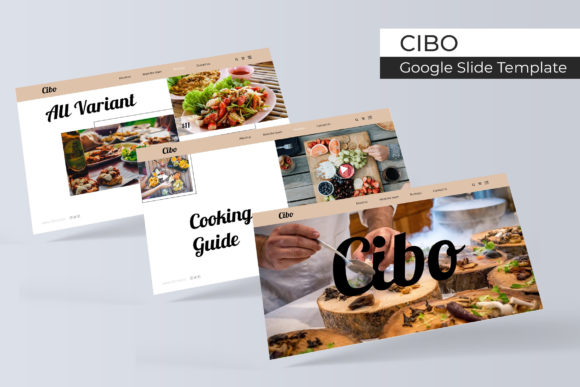
Cibo Google Slide Template: 150+ Slides for Your Next Pitch
You’ve got the idea, the data, and the passion, but when you open a blank presentation file, the cursor just blinks back at you. We’ve all been there—staring at a white canvas, trying to force creativity while the clock ticks down. The difference between a forgettable meeting and a captivated audience often comes down to visual storytelling, not just the words you speak. That is exactly why a tool like the Cibo Google Slide Template isn't just a download; it's a stress-reliever for anyone who needs to look professional without spending weeks on design.
What sets this package apart is its sheer volume and versatility. With over 150 total slides, this isn't a one-trick pony. It is built on a foundation of five premade color schemes, offering 30 distinct slides for each palette. Whether you are a startup founder pitching to investors, a marketer presenting quarterly analytics, or a freelancer pitching a new brand identity, the structure is already there waiting for you. It moves beyond basic bullet points, offering handcrafted infographics that turn dry statistics into visual narratives that people actually understand.
Design That Adapts to Your Brand
One of the biggest hurdles in using templates is the "template look"—that generic, cookie-cutter feel that makes your audience zone out. Cibo avoids this through pixel-perfect illustrations and a modular design system. The Master Slides architecture is the engine under the hood, allowing you to make global changes without breaking the layout. If you decide halfway through your design process that your brand color is shifting from deep teal to coral, you aren't stuck manually recoloring every box and chart. The 5 Color Variation system ensures that your visual identity remains consistent, which is crucial for brand recognition.
For those who aren't professional designers, the drag & drop functionality is a lifesaver. The picture placeholders are designed to be intuitive. You don't need to crop images in Photoshop before importing them; simply drop your high-res photography into the designated area, and the template handles the framing. This is particularly useful for portfolio slides or gallery layouts where visual impact is everything. If you are a photographer or interior designer, you need your work to shine without being cropped awkwardly. The Resizable and Editable Graphic elements mean you can scale vectors up or down without losing quality, ensuring your presentation looks crisp on a laptop screen or a massive conference projector.
Practical Applications Beyond the Boardroom
While the primary function is presentations, the utility of a robust design system like Cibo extends into other areas of your workflow. Think about social media graphics. If you are creating a carousel post for Instagram or LinkedIn explaining a process, you can utilize the "Section Break Slides" to create high-impact headers. The clean lines and modern typography inherent in the design translate well to static images. Instead of starting from scratch in Canva, you can export a specific slide as a PNG or PDF and use it as a standalone graphic for your feed.
Furthermore, consider the needs of small business owners creating internal documentation. Employee handbooks, training manuals, and company culture decks often look disjointed. Using the Cibo template ensures that your internal communications carry the same professional presentation quality as your external sales pitches. It helps in establishing a culture of quality from the inside out. Even for bloggers and content creators, these slides can be repurposed to create "quote cards" or data visualizations that can be embedded directly into website articles, enhancing readability and breaking up long blocks of text.
Maximizing the 150+ Slide Architecture
Having 150 slides can feel overwhelming, but it’s actually about having the right tool for the right moment. You will likely never use all of them in a single deck, but having them in your library means you are prepared for any scenario. The package includes 5 PPTX Files and 5 PPTX Widescreen formats, covering the standard 4:3 and the modern 16:9 aspect ratios. This is a detail that matters; if you are presenting in an older conference room with a legacy projector, you need the 4:3 ratio to avoid black bars on the side. Conversely, the widescreen format is essential for modern webinars and large displays.
The infographic elements deserve a closer look. Visualizing data is one of the hardest parts of presentation design. Cibo includes pre-built charts, timelines, and process flows that are fully editable. This is where modern typography meets data science. Instead of pasting a chart from Excel—which often looks jarring against a designed background—you can use the template’s native charts to maintain that visual consistency. This ensures that your marketing assets look cohesive, whether you are showing growth metrics or workflow processes.
Technical Details and Workflow Efficiency
Let’s talk about the technical side, specifically regarding the font used. The package comes with a Readme First file and links to free font downloads. This is a critical step often overlooked. When you open a template and see a "missing font" error, it kills your momentum. Cibo mitigates this by guiding you to install the specific typeface used by the designers. This font choice isn't arbitrary; it has been selected for readability and hierarchy. It likely pairs a strong sans serif font for headers with a clean body text style, ensuring that your message is legible even from the back of the room.
It is important to note the disclaimer regarding photographs. The preview images are for illustration purpose only. This is standard for premium templates to keep licensing costs down. However, this actually works in your favor. It forces you to use your own imagery, which strengthens your brand identity. A presentation filled with generic stock photos feels impersonal. By using your own team photos, your own product shots, or your own client work, you make the presentation authentically yours. The picture placeholder system is designed specifically to make this swap as seamless as possible.
Elevating Your Visual Communication Strategy
Ultimately, a tool like the Cibo Google Slide Template is about removing friction from the creative process. It serves as a bridge between a raw idea and a polished visual communication asset. For the entrepreneur who needs to focus on their pitch rather than aligning text boxes, or the designer who needs a clean base to build upon, this collection offers a significant time-saving advantage.
When you strip away the complexity of layout design, you free up mental energy to focus on what matters: your story. Whether you are using it for a startup pitch, a corporate training session, or a creative portfolio review, the structure provided by the 150+ slides ensures that you always have a professional canvas at your fingertips. It’s not just about making things look pretty; it’s about making your ideas clear, memorable, and impactful.