Unlocking Visual Harmony: The Pastelle Power Point Template
Every entrepreneur, marketer, or creative professional eventually hits a wall when trying to present their ideas. We have all been there: staring at a blank slide deck, trying to figure out how to translate complex data or a brand story into something visually digestible. The struggle often lies not in the content itself, but in the tool used to deliver it. Standard, default templates often feel sterile, lacking the personality required to make a lasting impression. This is where a dedicated design asset like the Pastelle Power Point Template changes the game. It moves beyond basic functionality, offering a curated aesthetic that immediately elevates the quality of your presentation, ensuring that your visual communication matches the professionalism of your ideas.
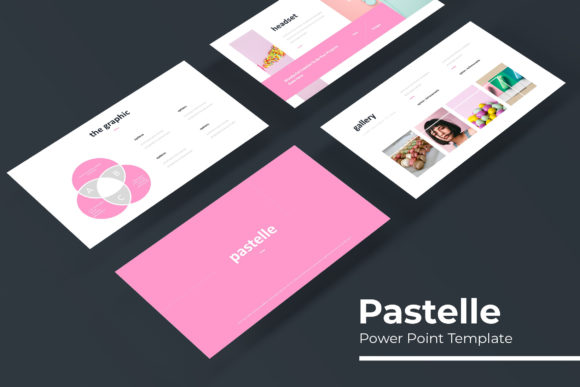
The defining characteristic of this template collection is its "pastelle" aesthetic—a sophisticated use of soft, muted color palettes that evoke a sense of calm, creativity, and modern elegance. Unlike the harsh neon or corporate greys of standard office software, these hues are gentle on the eyes, making them perfect for lengthy presentations where viewer fatigue is a concern. However, "soft" does not mean boring. The design language relies on clean lines, ample white space, and a structure that guides the viewer’s eye naturally from one point to the next. It strikes a delicate balance between being visually interesting enough to capture attention and being subtle enough not to distract from the speaker's message. This makes it an ideal choice for industries ranging from fashion and lifestyle to wellness, architecture, and modern tech startups looking for a warmer, more human touch in their branding.
A Deep Dive into Design Assets: What Makes It Stand Out?
When investing in design assets, the value lies in the details and the flexibility offered by the creator. The Pastelle template is not just a single file; it is a comprehensive toolkit designed for versatility. With over 150 total slides distributed across five premade color themes, the sheer volume of content available is impressive. Each color variation provides 30 distinct slide layouts, ensuring that you never run out of ways to visualize your data. This structure allows users to switch between a soft blush pink theme for a product launch and a muted sage green theme for a corporate sustainability report without needing to reformat the entire deck.
One of the most practical features included in this package is the use of handcrafted infographics. Data visualization is often the hardest part of presentation design. Creating charts and graphs from scratch requires significant time and skill in vector software. This template removes that barrier by providing pixel-perfect illustrations that are fully editable. Whether you are presenting quarterly sales figures, outlining a project timeline, or explaining a complex workflow, these infographics allow you to plug in your numbers and have a professional-looking chart ready in minutes. Furthermore, the inclusion of Section Break Slides helps in organizing long-form presentations. These distinct divider pages act as mental palate cleansers for the audience, signaling a shift in topic and helping to structure the narrative arc of your talk.
Practicality Meets Creativity: Features for the Modern Creator
For the busy professional—whether you are a small business owner running a lean operation or a content creator managing multiple brands—efficiency is paramount. The Pastelle Power Point Template is built on the concept of "drag and drop" functionality, anchored by Master Slides. This technical backbone ensures that the design remains consistent throughout the document. If you decide to change a font style or adjust the color scheme slightly, doing so through the Master Slide applies those changes globally, saving hours of tedious manual adjustments. This feature is crucial for maintaining visual consistency, a key component of strong brand identity.
Another significant advantage is the "Picture Placeholder" feature. In the past, integrating images into presentations often involved awkward cropping or resizing that distorted the composition. This template utilizes intuitive placeholders where you can simply drag your photograph into a specific zone, and the template automatically resizes and crops it to fit the designated artistic frame. This ensures that your portfolio slides, team introductions, or product showcases always look sharp and intentional. It removes the guesswork from layout design, allowing you to focus on the quality of your imagery rather than the mechanics of aligning it.
Beyond the Slide Deck: Diverse Applications
While the primary function of this asset is a presentation, the elements contained within the Pastelle Power Point Template lend themselves to a variety of other creative projects. Think of the slides as individual design canvases. Because the graphics are resizable and editable, a skilled user can repurpose these layouts for different marketing assets. For instance, a beautifully designed "quote" slide can be exported as a high-resolution image and used as an Instagram post or a Pinterest pin. A timeline infographic can be adapted for a company brochure or a blog post header.
This versatility extends to internal business operations as well. Entrepreneurs can use the template to create standardized training manuals for new hires. The clean layout and clear hierarchy of information make it excellent for educational materials. Similarly, if you are pitching to investors, the "Pitch Deck" style slides provide the necessary structure to tell a compelling business story, moving from the problem to the solution, and finally to the financials. The professional presentation style helps build credibility, subconsciously signaling to the viewer that you are detail-oriented and serious about your venture.
Maximizing Impact: Typography and Pairing
A template is only as good as the typography that holds it together. The Pastelle template utilizes a free font, the download link for which is conveniently included in the Readme file. This is a massive benefit for users who may not have extensive font libraries or expensive design subscriptions. By using a high-quality, free typeface, the creators have ensured that the visual integrity of the design remains intact regardless of the user's budget.
However, the template also serves as a fantastic foundation for experimentation. If you have a specific brand typeface—perhaps a specific sans serif for headers and a serif for body text—you can easily swap these in. The layouts are designed to be flexible enough to accommodate different visual weights. For example, if you are working on a high-fashion editorial layout, you might swap the included font for a high-contrast modern serif to add a touch of luxury. Conversely, for a tech startup presentation, a geometric sans serif might better convey innovation and speed. The structure provided by the slides helps you test these pairings in a real-world context, allowing you to see how your chosen typography interacts with the pastel color palette and the whitespace.
Final Thoughts on Usability and Licensing
Before downloading any design asset, it is always wise to review the licensing. The Pastelle Power Point Template is designed for both personal and commercial use, which covers the vast majority of scenarios for designers, marketers, and business owners. Whether you are creating a presentation for a client, a pitch for your own startup, or educational content for a course, you are covered. However, as noted in the description, the preview photographs are for illustration only. This is standard practice in the template world; it encourages users to inject their own brand photography or utilize stock image sites to find visuals that perfectly match their specific narrative. This actually works in your favor, as it prevents your presentation from looking generic or "stock."
In summary, the Pastelle Power Point Template is more than just a set of slides; it is a comprehensive design system. It solves the common pain points of presentation design—inconsistency, lack of data visualization options, and time-consuming formatting. By providing a robust set of 150+ slides, handcrafted infographics, and a user-friendly interface, it empowers anyone to create professional, engaging, and visually harmonious presentations. Whether you are pitching a new business idea, showcasing a portfolio, or presenting a marketing strategy, this tool provides the visual foundation necessary to communicate with clarity and style.