Moreless Power Point Template: Designing Impactful Slides
Let’s be honest—most business presentations look like they were assembled in a rush using default software settings. You’ve seen them: cluttered slides, mismatched colors, and fonts that are impossible to read from the back of the room. If you’re pitching an idea, training a team, or showcasing a portfolio, that kind of visual chaos doesn’t just look unprofessional; it actively undermines your message. The goal isn’t just to share information; it’s to make that information stick. That’s where a thoughtfully designed asset like the Moreless Power Point Template comes into play, offering a structured yet flexible foundation for anyone who needs to communicate ideas visually with clarity and style.
Beyond the Default: Why a Curated Template Library Matters
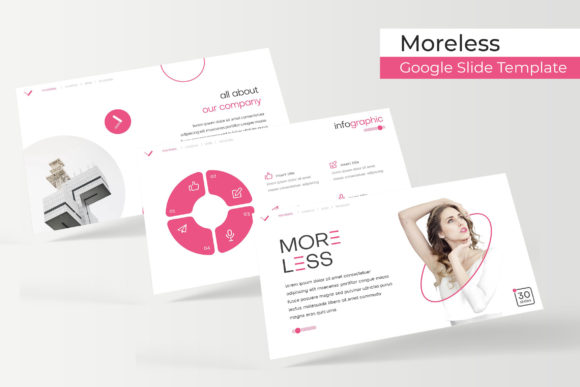
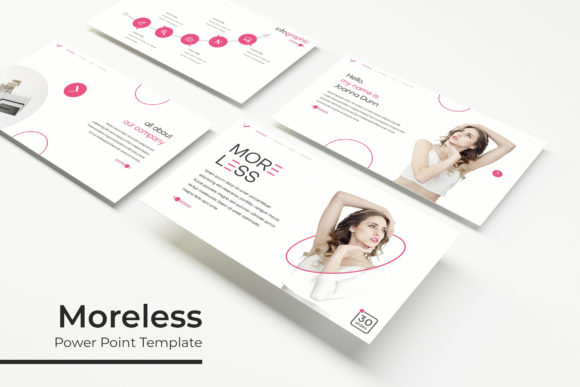
Think of a presentation template not as a rigid cage, but as a well-organized toolbox. The Moreless package, with its 150+ total slides, understands this. It’s not a single, one-size-fits-all file. Instead, it provides a curated library organized around five premade color themes, with 30 distinct slides dedicated to each palette. This approach solves a fundamental problem for busy professionals: the need for variety without the hassle of starting from a blank canvas every single time. Whether you’re a startup founder needing a clean blue theme for investor meetings or a creative agency looking for a bold, vibrant palette for a client showcase, having those options pre-built saves hours of design time. The consistency within each color set ensures your final presentation feels cohesive, which is a subtle but powerful way to build trust with your audience.
The Anatomy of a Versatile Slide Deck
What makes a template genuinely useful isn’t just its looks—it’s its functionality. The Moreless PowerPoint Template is built with practicality at its core, which is evident in its specific features. The handcrafted infographics are a standout. Instead of generic charts, you get data visualizations that feel intentional and tailored, helping to transform dry statistics into a compelling visual story. This is crucial for marketers explaining campaign results or educators breaking down complex processes. Similarly, the inclusion of dedicated section break slides and gallery/portfolio slides shows an understanding of presentation flow. A well-placed section break doesn’t just organize content; it gives your audience a mental breather, making the information easier to digest. The gallery slides, with their picture placeholders, are a dream for designers and photographers needing to display work without fiddling with alignment and cropping for every single image.
Practical Applications for Real-World Projects
The true test of any design asset is how it integrates into your actual workflow. For a small business owner, the Moreless template can become the backbone of all visual communication. Use it to create a consistent brand identity deck that you can share with contractors, ensuring your logo, colors, and messaging are represented correctly. For a content creator or blogger, these slides can be repurposed into stunning social media graphics or YouTube video backgrounds. Imagine pulling a beautifully designed quote slide or a process infographic directly into your Instagram feed—it instantly elevates your content. The resizable and editable graphics mean you’re not locked into the template’s original dimensions. You can adapt a single slide for a website banner, a printed poster, or an email newsletter header, maintaining visual consistency across every touchpoint of your brand.
Mastering the Details for a Polished Outcome
A pixel-perfect illustration or a clean icon set can make the difference between something that looks amateur and something that looks professional. This template’s foundation on master slides is a key technical detail that benefits users of all skill levels. It means that when you edit the master slide to change a font or adjust the color scheme, those changes cascade throughout the entire presentation automatically. This ensures uniformity and saves you from the tedious work of editing each slide individually. The drag-and-drop picture placeholder functionality is another practical feature that respects your time. Swapping out placeholder images with your own photos or product shots becomes a simple, intuitive task, allowing you to focus on your content and narrative rather than wrestling with software tools.
Making It Your Own: Customization and Brand Integration
While the template provides a strong starting point, its real value is unlocked when you make it uniquely yours. The five included PPTX files (both standard and widescreen formats) give you the flexibility to choose the right aspect ratio for your context, whether it’s a traditional conference screen or a modern webinar format. The readme file and free font download link are thoughtful inclusions that prevent the common headache of missing fonts. However, this is also your opportunity to think strategically about typography. You might keep the template’s clean sans-serif font for body text for maximum readability but swap the headings with a premium display font that better matches your brand’s personality—maybe a strong serif for authority or a modern geometric sans for a tech-forward feel. This practice of font pairing is essential for creating visual hierarchy and making your presentation not just informative, but also aesthetically engaging.
Integrating Visual Assets into Your Brand Ecosystem
Ultimately, tools like the Moreless PowerPoint Template are most effective when viewed as part of a larger brand ecosystem. The styles and layouts you choose for your presentations should echo the design language of your website, your social media graphics, and your printed materials. This creates a seamless experience for anyone interacting with your brand, reinforcing recognition and professionalism. For entrepreneurs, this means using the same color palettes and design motifs in a pitch deck as you do on your product packaging. For educators or trainers, it means creating a series of materials that look and feel connected, making your content more recognizable and trustworthy. By thoughtfully applying and adapting these pre-designed elements, you’re not just making a single presentation better—you’re building a more cohesive and impactful visual identity, one slide at a time.