Streamline Your Event App Design with a Professional UI Kit
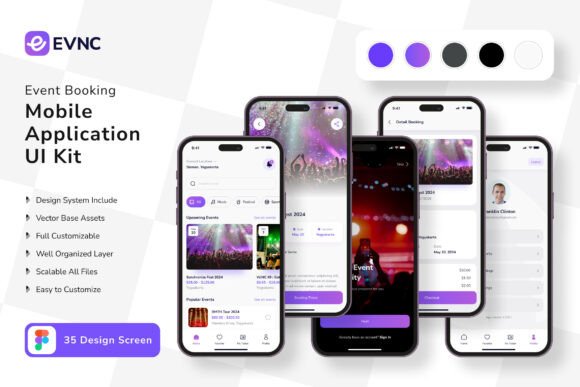
You have a brilliant idea for an event booking application. Maybe it's for concert tickets, a local workshop series, or a corporate conference platform. The concept is clear, but the blank canvas of a design file can be paralyzing. This is where a comprehensive mobile UI kit becomes your most valuable asset. Instead of starting from absolute zero, you're handed a meticulously crafted foundation. The Event Booking Application Mobile UI KIT provides exactly that—a collection of 35 pixel-perfect screen designs that cover the entire user journey, from event discovery to final confirmation.
A Toolkit for Real-World Projects
Think of this UI kit not as a rigid template, but as a versatile design system. It's built for the practical needs of designers, entrepreneurs, and developers who need to move quickly without sacrificing quality. The kit includes over 80 UI elements—buttons, input fields, cards, navigation bars—all designed with consistency in mind. Because every component is 100% vector and uses symbol objects in Figma, making global changes is straightforward. Want to shift your brand's color palette? A few edits to the master styles propagate across all 35 screens. This level of editability is crucial for maintaining visual consistency, a cornerstone of strong brand identity.
The applications extend far beyond a single event app. Consider how these screens can inform other projects:
- Prototyping for Clients: Quickly assemble interactive prototypes to pitch ideas or gather feedback, demonstrating a polished vision before a single line of code is written.
- Website and Landing Page Design: The clean, modern typography and layout structures are perfect for designing the marketing site for your app or service.
- Social Media Graphics: Use the UI components as a visual language to create cohesive promotional graphics for Instagram stories or LinkedIn posts, ensuring your digital marketing assets feel connected to the app itself.
- Internal Tools and Dashboards: The data display and list views can be adapted for admin panels or attendee management dashboards, creating a unified experience across all digital touchpoints.
Practical Design, Not Just Aesthetics
A well-executed UI kit does more than look good; it solves problems. The inclusion of free font and free icon vector packs means you have a complete, ready-to-use design language. This removes the guesswork and licensing headaches often associated with sourcing design assets. The fully layered files ensure you can isolate and edit any element, from a single icon to an entire booking flow. This granular control is what allows you to truly make the design your own, adapting it to a niche audience or a specific brand voice.
For a small business owner creating their first app, this kit accelerates development. You're not debating button shapes or icon styles; you're focusing on content strategy and user experience. For a designer, it's a powerful commercial font and component library that can be repurposed across client work, saving hours of production time. The scalability of the vectors means the same design can be tested on a phone mockup and scaled for a presentation slide without losing clarity.
Integrating the Kit into Your Workflow
Getting started is simple, but a thoughtful approach yields the best results. Begin by exploring all 35 screens to understand the scope. Identify the core user flows relevant to your project—perhaps a simplified version focusing on event browsing, search, and checkout. Use the Figma environment to duplicate the screens you need into your own project file. From there, customize.
Start with the foundational elements: update the color styles to match your brand guidelines. Swap out the placeholder text with your own compelling copy. Replace the preview images with your event photos or illustrations. The kit's structure makes this efficient, as styles and components are logically organized. Pay attention to the font pairing choices provided; they offer a tested balance of hierarchy and readability that you can emulate with your own premium font selections if needed.
Remember, the goal is not to launch the kit as-is, but to use it as a springboard. Test the flow on your own device. Is the touch target size comfortable? Is the contrast ratio accessible? The clean, modern typography and spacing in the kit provide a strong baseline, but real-world testing is irreplaceable. Use the structure to build, but let your specific audience's needs guide the final details.
This approach transforms a static download into a dynamic tool. It bridges the gap between a raw idea and a tangible, testable product. Whether you're building for your own venture or a client, having a robust, fully editable foundation like this Event Booking Application Mobile UI Kit means you spend less time on boilerplate design and more time on the unique features and content that will make your application stand out. It’s about working smarter, leveraging professional assets to achieve a professional presentation that builds trust with your users from the very first screen.