Build Smarter Finance Apps with This Comprehensive UI Kit
Building a mobile application from scratch is a monumental task. You have the idea, the business logic, and the drive, but staring at a blank canvas in your design software can be paralyzing. What should the dashboard look like? How do you visualize complex financial data in a way that feels intuitive rather than intimidating? For entrepreneurs, designers, and startups venturing into the fintech space, the gap between a brilliant concept and a polished, user-ready interface is where projects often stall. This is precisely the challenge a robust, pre-built design system aims to solve.
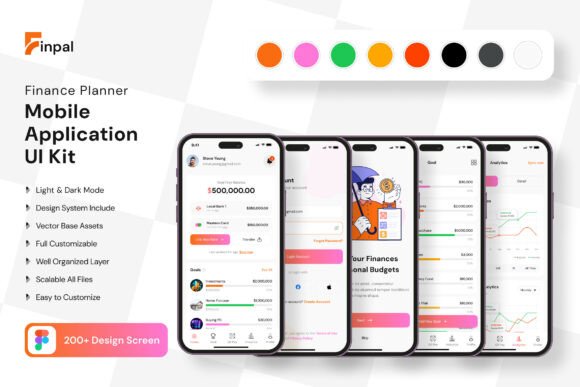
Imagine having a library of over 200 meticulously crafted screens at your fingertips, ready to be mixed, matched, and customized. That's the core promise of the Finance Planner Application Mobile UI KI and AI Chat Bot App Mobile UI KIT. This isn't just a collection of pretty pictures; it's a foundational toolkit designed to accelerate your development process. It provides a visual language for your finance app, covering everything from user onboarding and account dashboards to transaction histories and AI-powered chat interfaces. By starting with a professional template, you bypass the initial design hurdles and focus your energy on what truly matters: refining your unique value proposition and user experience.
More Than Just Screens: A System for Visual Consistency
A successful app isn't a random assortment of screens; it's a cohesive journey. One of the biggest advantages of using a comprehensive UI kit is the built-in consistency it provides. This particular kit includes over 80 reusable UI elements—buttons, input fields, cards, navigation bars, and icons—all designed to work together harmoniously. This means the "Transfer Funds" button on your dashboard will feel perfectly at home next to the "Pay Bill" button in another section. This visual harmony builds user trust. When every interaction feels predictable and intentional, users feel more confident navigating your app, which is critical for any application handling sensitive financial data.
The practical applications extend far beyond the initial app build. Consider these scenarios:
- For the Startup Founder: You can rapidly prototype your Minimum Viable Product (MVP) to present to investors. Instead of describing your vision, you can show them a tangible, high-fidelity representation of your app's user flow, complete with an integrated AI chatbot interface. This level of professionalism can significantly strengthen your pitch.
- For the Freelance Designer: This kit acts as a powerful starting point for client projects. You can deliver polished mockups faster, allowing more time for strategic thinking and user testing. The scalable vectors and fully layered Figma file mean you can adapt the design to any client's brand identity in minutes, not days.
- For the Marketing Team: Need to create promotional graphics for a new app feature? You can pull directly from the kit's elements to create consistent social media posts, website banners, or email newsletter graphics that accurately represent the app's look and feel, strengthening brand recognition across all channels.
Practical Customization: Making the Template Your Own
The true power of a design asset lies in its flexibility. A common concern with templates is that they will lead to a generic-looking product. This is where the "fully editable" nature of this kit becomes its most valuable feature. Built with 100% vector layers in Figma, every single component is yours to manipulate. The color palette is easily swappable to match your brand guidelines. You can add or subtract elements from a screen—perhaps you don't need a cryptocurrency tracker, so you replace that module with a savings goal visualizer.
The inclusion of symbol objects streamlines this process. Change a master button style once, and the update cascades across every screen where it's used. This non-destructive workflow is essential for efficient iteration. Furthermore, the kit comes with free fonts and icon vectors, removing additional hurdles and costs from your design process. You're not just buying static images; you're investing in a dynamic design system that grows with your project. The note that preview images are not included is a standard and important clarification—it ensures you understand you're purchasing the functional design framework, not the stock photography, which you'll replace with your own branded assets anyway.
Aligning Your Design with Your Project's Goals
Choosing to use a pre-built UI kit is a strategic decision. It’s about efficiency and quality, but it’s also about starting your project on the right visual foot. Here’s how to leverage a resource like this effectively:
- Define Your Brand Personality First: Before diving into the Figma file, have your brand colors, primary font, and logo finalized. Is your finance app targeting young professionals with a sleek, minimalist vibe? Or is it for families, requiring a warmer, more approachable feel? This foundational work will guide every customization choice you make.
- Don't Just Use, Understand: Take time to study the screen layouts. Why is the most important data placed in a prominent card? How does the spacing guide the user's eye? The best UI kits are built on sound design principles. Learning from them can make you a better designer or product owner in the long run.
- Test for Readability and Accessibility: Your app must be usable by everyone. Use the kit's typography as a starting point, but always test text sizes for legibility on actual devices. Ensure your chosen color combinations have sufficient contrast. The scalable vectors make it easy to adjust sizes without losing quality.
- Think About the Entire User Journey: Don't just pick a pretty dashboard. Map out the complete flow a user will take—from signing up, to connecting a bank account, to setting a budget, to chatting with the AI assistant for help. The value of a 200-screen kit is that it likely covers these nuanced, yet critical, interaction states.
Ultimately, tools like the Finance Planner Application Mobile UI KI are about democratizing great design. They provide a professional-grade foundation that allows creators to focus on innovation rather than reinventing fundamental UI patterns. Whether you're building a full-scale fintech product, a personal budgeting tool, or a presentation for a client, having a versatile and comprehensive design system at your disposal is not a shortcut—it's a smart, strategic approach to bringing your digital vision to life with confidence and clarity.