Squidbod: The Versatile PowerPoint Template for Modern Brands
Creating a presentation that feels cohesive, professional, and visually engaging can be a significant challenge. Many templates offer a handful of slides that quickly feel repetitive, forcing you to spend hours searching for additional graphics or struggling with mismatched elements. The Squidbod PowerPoint Template addresses this common frustration head-on. With over 150 total slides organized into five distinct color themes, it provides a robust foundation for anyone who needs to communicate ideas clearly and stylishly, from startup founders pitching investors to designers showcasing a portfolio.
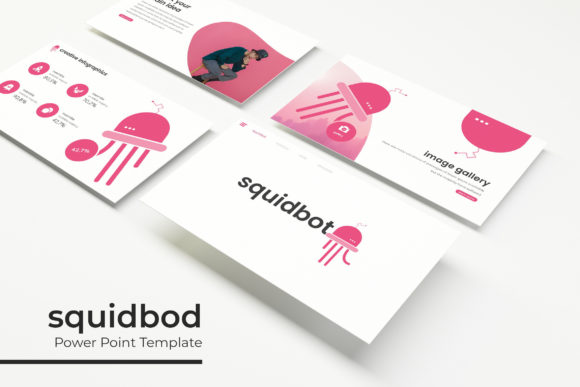
At its core, Squidbod is built around the principle of flexibility. Each of the five premade color variations contains 30 carefully designed slides. This isn't just about changing a background shade; each theme maintains a consistent visual language, ensuring your brand's presentation looks unified whether you're discussing quarterly results, introducing a new product, or outlining a creative project. The color palettes range from bold and energetic to muted and professional, giving you options that align with different brand personalities and audience expectations.
Designed for Real-World Projects
Where Squidbod truly shines is in its practical application across diverse creative and business needs. The handcrafted infographics are particularly useful for making complex data digestible. Instead of generic pie charts, you get thoughtfully designed visual metaphors that can illustrate processes, timelines, or comparisons in a way that holds audience attention. For a marketing team presenting campaign results, or a blogger explaining a multi-step guide, these infographics turn abstract numbers into compelling stories.
The inclusion of dedicated gallery and portfolio slides makes this template ideal for visual professions. Photographers, graphic designers, architects, or crafters can display their work without the distraction of cramped layouts or awkward image cropping. The picture placeholders are fully resizable and editable, allowing you to simply drag and drop your images into perfectly sized frames. This pixel-perfect approach means your portfolio maintains its polish, reinforcing your professional credibility from the first slide to the last.
Beyond presentations, the slide layouts themselves can be repurposed as design assets for other projects. The section break slides, with their clean typography and balanced composition, can serve as inspiration for social media graphics or website hero sections. The consistent use of modern typography throughout the template demonstrates how effective font pairing can elevate a design—something valuable for anyone developing their brand identity.
Streamlining Your Workflow and Brand Consistency
One of the biggest advantages of using a comprehensive template like Squidbod is the time it saves while improving output quality. Because the entire package is based on master slides, making a global change—like adjusting a font size or altering a color accent—is a matter of seconds, not hours. This master slide architecture ensures that every element remains aligned and proportional, which is crucial for maintaining a professional look across lengthy presentations.
For small business owners and entrepreneurs, this consistency is gold. Your presentation is often the first detailed interaction a potential client or partner has with your brand. A disjointed slide deck can subconsciously signal a lack of attention to detail. Squidbod helps you avoid that pitfall. The included readme file and free font download link are thoughtful touches that remove guesswork, letting you replicate the exact aesthetic shown in the previews immediately. Knowing the fonts are free for commercial use also eliminates licensing headaches, a common concern when using premium design assets.
Think of the five color themes not as separate templates, but as a toolkit for different contexts. You might use a vibrant, high-contrast theme for an energetic startup pitch to consumers, and switch to a more subdued, professional palette for an internal strategy meeting with stakeholders. This adaptability allows a single template purchase to serve multiple functions within your organization, providing excellent value and reinforcing visual consistency across all your communications.
Practical Tips for Maximizing Your Template
To get the most out of the Squidbod PowerPoint Template, consider a few practical strategies. First, choose your color theme based on your audience and objective. A theme with bright accents might work well for a creative workshop, while a neutral scheme could be better for a formal report. Don't just pick your favorite color; think about the psychological impact and readability for your specific context.
Next, leverage the master slide functionality. Before you start adding content, take a moment to explore the slide master view. You can set your preferred fonts, adjust placeholder positions, or add your company logo to the master slide once, and it will automatically populate across all relevant slides. This ensures brand consistency and saves significant editing time later.
When using the infographic slides, resist the urge to overload them with data. These visuals are designed to simplify, not complicate. Use them to highlight key metrics or illustrate a core concept, then explain the details in your verbal presentation or in accompanying notes. The goal is clarity and impact, not cramming every number onto the slide.
Finally, remember that the template is a starting point. The resizable and editable graphics mean you can customize layouts to better fit your content. If a slide has three image placeholders but you only have two strong photos, consider repurposing one placeholder for a compelling quote or a key statistic. The best presentations feel tailored, not templated.
A Foundation for Professional Communication
Ultimately, the value of a tool like the Squidbod PowerPoint Template lies in its ability to elevate your communication. It provides a structured yet flexible canvas that helps you present your ideas, your work, and your brand in the best possible light. The attention to detail—from the pixel-perfect illustrations to the inclusion of widescreen formats—shows an understanding of what modern presenters actually need.
Whether you're using it for a critical business pitch, a client workshop, an educational seminar, or to showcase a creative portfolio, the template offers a reliable and visually appealing framework. It reduces the friction of design, allowing you to focus on what truly matters: your message and your audience. In a world where attention is scarce, starting with a polished, professional foundation isn't just helpful; it's a strategic advantage.