Puzza Power Point Template: Mastering Professional Visuals
You know the feeling. You have a brilliant idea, a solid business plan, or a critical update for your team, but when you open PowerPoint, you’re staring at a blank slide. The default layouts feel stale, and starting from scratch is a time sink you can’t afford. This is where a thoughtfully constructed template becomes less of a luxury and more of a productivity powerhouse. The Puzza Power Point Template is designed to bridge that gap between your raw content and a polished, professional presentation that commands attention.
A Foundation Built for Clarity and Impact
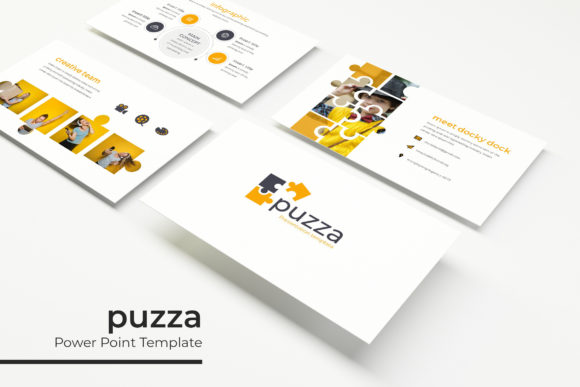
What immediately sets this template apart is its commitment to visual harmony and user control. With over 150 total slides, you’re not getting a handful of layouts repeated. Instead, you get five distinct, premade color themes, each containing 30 unique slides. This structure means you can choose a palette that aligns with your existing brand identity from the moment you open the file, eliminating the guesswork and endless tweaking of colors. Each theme is a cohesive visual language, ensuring your presentation feels unified from the opening agenda slide to the final thank you.
The design philosophy centers on clarity. Handcrafted infographics transform complex data into digestible, engaging visuals. Instead of forcing your audience to decipher a dense chart, you can guide them through a process, compare statistics, or outline a timeline with intuitive graphic elements. These aren’t generic clipart; they are purpose-built illustrations that add context and professionalism. Similarly, dedicated section break slides provide a clean visual pause, helping you structure your narrative and keep your audience oriented throughout a longer talk.
Practical Applications for Real-World Projects
The versatility of a robust template like Puzza extends far beyond the corporate boardroom. Consider its utility for a small business owner preparing a investor pitch. The clean, modern typography and ample space for imagery—thanks to pixel-perfect picture placeholders—allow you to showcase your product, team, and market data without clutter. You can drag and drop your own photographs directly onto the designated areas, maintaining perfect alignment and proportion every time.
For educators and workshop facilitators, the template’s structure is invaluable. You can build a complete course module or a multi-part seminar series using the different color themes to visually distinguish between topics or days. The gallery and portfolio slides are perfect for showcasing student work, project examples, or visual case studies. The resizable and editable graphics mean you can adapt any element to fit your specific content needs, whether you’re illustrating a scientific process or displaying artistic techniques.
Marketing teams and content creators will find it a reliable asset for client reporting and campaign planning. Presenting quarterly results, social media strategy, or content calendars on slides that look consistently professional reinforces your agency’s credibility. The master slide system ensures that any change to a font, color, or logo placement on the master automatically updates throughout the entire presentation, saving hours of manual editing and preventing inconsistencies.
Streamlining Your Design Workflow
One of the most significant advantages is how it streamlines the creative process. The drag-and-drop functionality based on master slides means you spend less time fighting with formatting and more time focusing on your message. Every graphic element, from charts to icons, is fully editable. If a pre-designed infographic doesn’t quite fit your data set, you can ungroup it and modify the individual components to match your exact figures. This level of control is crucial for maintaining accuracy and professionalism.
The inclusion of free fonts is a thoughtful touch that removes another barrier. Instead of receiving a template where the typography is locked or requires an expensive commercial license, you get clear instructions and download links. This is especially important for small businesses and entrepreneurs who are mindful of their design budget. You can implement the template immediately, confident that you have the legal right to use the fonts in your final presentation, whether it’s for an internal meeting or a public-facing webinar.
When integrating this into your brand workflow, think of it as a starting point for your visual system. The five color variations offer a fantastic playground for testing which palette resonates best with your audience. You might use a bold, high-contrast theme for a sales pitch and switch to a softer, more subdued one for a workshop handout. This flexibility allows you to maintain a core brand feel while tailoring the mood to the specific context of your communication.
Elevating Your Visual Communication
Ultimately, the goal is to communicate with impact. A well-structured presentation does more than just look good; it enhances comprehension and retention. By using the section break slides, you create a logical flow that makes complex information easier to follow. The consistent use of typography and spacing across all 150+ slides guides the viewer’s eye naturally, reducing cognitive load and allowing them to focus on your ideas.
For anyone regularly creating slide decks—from freelancers pitching new clients to teachers developing lesson plans—the efficiency gains are substantial. You’re not just buying slides; you’re investing in a system that reduces design friction, ensures brand consistency, and elevates the perceived value of your content. The portfolio slides alone can transform how you present your past work, turning a simple list of projects into a compelling visual narrative. In a world where attention is fleeting, starting with a powerful, polished foundation like the Puzza Power Point Template means your message is heard clearly from the very first click.