Mastering Visual Cohesion with the Cromo PowerPoint Template
There is a specific kind of frustration that sets in around slide 15 of a presentation. You’ve got your content ready, your talking points are solid, but the visual side starts to crumble. You find yourself manually moving text boxes pixel by pixel, trying to match a color you used three slides ago, or wrestling with an image that just won't sit right inside a shape. It feels less like creating a presentation and more like fighting with the software. This is the exact scenario the Cromo PowerPoint Template was built to eliminate, offering a solution that balances high-end aesthetic appeal with the kind of rigid functionality busy professionals actually need.
Beyond Static Slides: The Architecture of 150+ Designs
When we talk about modern typography and layout design in presentation software, we are usually talking about limitations. PowerPoint often gets a bad rap for being clunky, but the Cromo collection flips that narrative by providing a library of 150+ total slides. This isn't just about having a high number of blank canvases; it’s about having the right structure for every phase of your pitch.
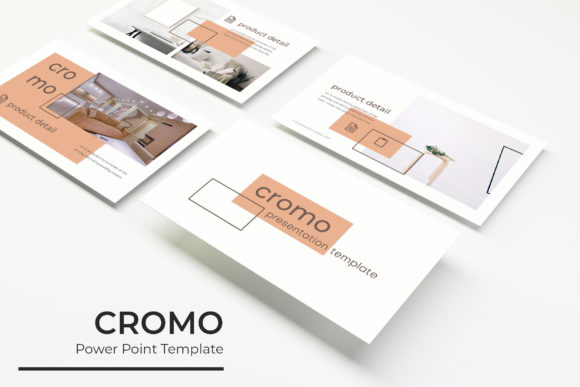
The true strength of this design asset lies in its modularity. The package includes 5 PPTX Files and 5 PPTX Widescreen formats, ensuring that whether you are presenting in a traditional conference room or a modern widescreen auditorium, your aspect ratio is perfect. But the real magic is in the 5 premade color themes. Each theme offers 30 slides, but because they are based on Master Slides, changing the entire mood of your deck takes seconds, not hours. If your brand identity shifts from a cool blue to a warm terracotta, you simply swap the theme, and the pixel-perfect illustrations and text styles update automatically.
Visual Storytelling and the "Drag & Drop" Workflow
For entrepreneurs and content creators, time is the most expensive currency. The Cromo template respects this by integrating resizable and editable graphic elements that function seamlessly. We often talk about font pairing in static design, but in a presentation, you have to pair your typography with imagery. The picture placeholder system in Cromo is designed for a true drag & drop experience. You don’t need to crop images manually; you simply pull your photo from a folder, drop it into the designated area, and the template handles the masking.
Furthermore, the inclusion of handcrafted infographics and section break slides allows for a narrative flow that keeps an audience engaged. Whether you are breaking down complex data or transitioning between topics, these slides provide a visual "breather" that aids in readability. The gallery and portfolio slide options are particularly useful for creatives who need to showcase work without the distraction of busy layouts. It provides a clean, gallery-style grid that lets the work speak for itself.
From Boardroom to Branding: Practical Applications
While this is technically a presentation template, its utility stretches far beyond the podium. Because the graphics are editable and the structure is so robust, Cromo serves as a central hub for marketing assets.
Consider a small business owner launching a new product. You can use the template to create the internal pitch deck for investors, but you can also repurpose those slides for social media graphics. By isolating a specific infographic slide and exporting it as an image, you have an instant Instagram post or a LinkedIn carousel that matches your brand identity perfectly.
The versatility extends to:
- Packaging Design: Use the layout grids to mock up box designs or product labels.
- Digital Products: Create high-value PDFs or lead magnets using the typography and layout styles.
- Editorial Layouts: The widescreen formats work beautifully for digital lookbooks or mood boards.
- Web Design: Use the slide structures as wireframes for website hero sections or landing pages.
The Technical Edge: Why "Pixel-Perfect" Matters
There is a distinct difference between a presentation that looks "fine" and one that looks "professional." The difference is usually alignment. The Cromo template is built on a grid system that ensures visual consistency. When you are dealing with modern typography, even a few pixels of misalignment can make a serif font look sloppy or a sans serif font look crowded.
Because the elements are vector-based, they remain crisp on 4K displays and projectors. You can resize a chart or an icon to fill a full slide or tuck it into a corner without any pixelation. This scalability is crucial for brand recognition; your logo and key graphics must look sharp regardless of the screen size. The package includes a Readme First file and links to the free font downloads used in the preview, ensuring that you can install the exact typeface required to maintain the intended aesthetic immediately.
Maximizing Impact with Minimal Effort
The goal of any premium font or template system is to remove barriers between your idea and its execution. The Cromo PowerPoint Template succeeds because it doesn't ask you to be a graphic designer to get designer-level results. It provides the framework—the master slides, the color theory, the typography—so you can focus entirely on your message.
Whether you are a marketer preparing a quarterly review, a teacher creating educational materials, or a creative agency pitching a new client, the ability to present information clearly and beautifully is a competitive advantage. By utilizing the section break slides to organize your thoughts and the editable graphics to visualize your data, you transform a standard presentation into a compelling visual story. It is a practical, robust tool for anyone serious about visual communication in a professional setting.