Alula Brush Keynote Template: Streamlining Your Next Presentation
You know the feeling. You have a brilliant idea, a compelling pitch, or a quarterly update that needs to be shared. The content is solid, the narrative is there. But then you open a blank slide deck, and the momentum just... stops. Choosing a color palette, wrestling with text boxes that won't align, searching for that one perfect icon—it's a time sink that can derail your focus. This is where a well-constructed template shifts from being a nice-to-have to a genuine productivity tool. The Alula Brush Keynote Template is designed precisely for this scenario, offering a comprehensive framework that lets you concentrate on your message rather than the mechanics of slide design.
A Foundation Built for Speed and Style
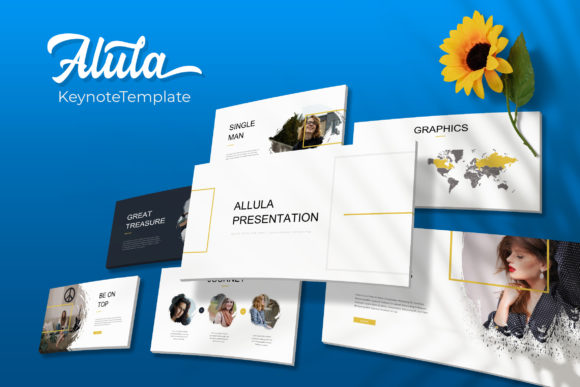
At its core, the Alula Brush package is about providing immediate structure and aesthetic consistency. It arrives with 150+ total slides, but the real advantage is how they're organized. Instead of one massive file, you get five premade color themes, each containing 30 meticulously designed slides. This means you're not just picking a color; you're adopting a complete visual language. Whether your brand leans towards a deep, professional navy or a vibrant, energetic coral, the typography, infographic styles, and graphic elements are already harmonized. This approach eliminates the guesswork and ensures that from your title slide to your final call-to-action, your presentation feels cohesive and intentionally designed.
The practical benefits extend to workflow. Every element is based on Master Slides, which is the backbone of any efficient Keynote project. Need to change a font or adjust the position of your logo across 30 slides? A single edit on the master slide propagates that change everywhere. The graphics are fully resizable and editable, and the picture placeholders are drag-and-drop ready. This means you can swap out a placeholder image with your own product photo or team headshot in seconds, without breaking the layout or spending time resizing and cropping. For a busy entrepreneur or marketing team, these minutes saved per slide add up to hours reclaimed over the course of a project.
Beyond Bullet Points: Visual Communication Tools
A common pitfall in presentations is over-reliance on text. The Alula Brush template counters this with a strong suite of visual communication aids. The handcrafted infographics are a standout feature. These aren't generic, clip-art-style charts. They're custom illustrations designed to make data digestible and engaging. Imagine presenting a complex marketing funnel or a project timeline not with a dense paragraph, but with a clean, visually intuitive diagram that guides your audience's understanding. This elevates your presentation from a data dump to a story.
Furthermore, the inclusion of section break slides and a dedicated gallery and portfolio slide is particularly useful. The section breaks provide a clear visual pause, helping to segment your talk and keep the audience oriented. The gallery slide, with its clean grid layout, is perfect for showcasing work samples, client testimonials, product variations, or event photos. It turns what could be a chaotic collage of images into a polished, professional display. This is invaluable for creatives, consultants, and agencies who need to demonstrate their capabilities visually.
Matching the Template to Your Project's Goals
Choosing a design asset like this comes down to alignment with your objectives. The Alula Brush - Keynote Template Presentation has a modern, clean aesthetic with a touch of organic texture from the brush-inspired elements. This makes it versatile, but particularly effective for projects that aim to feel approachable yet professional. Consider these applications:
- Brand Launches & Pitches: Use the cohesive color themes to present your brand identity, mission, and vision with authority.
- Marketing Reports: Transform dry analytics into compelling visual stories using the custom infographics.
- Workshop or Course Materials: Create engaging, easy-to-follow educational content for your students or attendees.
- Internal Team Updates: Make company meetings more dynamic and ensure information retention with clear, structured slides.
- Sales Decks: Present your product or service benefits in a visually persuasive way that supports your verbal pitch.
The key is to see the template not as a rigid cage, but as a flexible starting point. The pixel-perfect illustrations and clean lines provide a professional baseline, which you then customize with your own content, images, and final tweaks to make it uniquely yours.
Practical Considerations Before You Dive In
A successful presentation is more than just pretty slides. As you integrate a template like Alula Brush into your workflow, keep a few practical points in mind.
First, content hierarchy is everything. The template provides layouts for titles, subtitles, body text, and quotes. Use them as intended. A slide designed for a powerful quote will lose its impact if you cram in a full paragraph. Let the design guide your content structure.
Second, font pairing matters. The package includes the necessary free font download link, so you can install the exact typefaces used in the preview. This is crucial for maintaining the intended look. While you might be tempted to use your own brand fonts, test how they interact with the template's existing design language first. Sometimes, the provided fonts are integral to the visual balance.
Third, licensing is straightforward but important. The template is provided for your use in creating presentations. However, the note that photographs are not included is a standard and important reminder. You are responsible for sourcing your own imagery, whether from stock photo sites, your own photography, or licensed assets. This ensures you have full commercial rights to the final presentation you create and deliver.
Ultimately, a tool like the Alula Brush Keynote Template is about reducing friction. It handles the heavy lifting of design consistency, layout, and visual appeal, freeing you to focus on refining your message and delivering it with confidence. The next time you face a blank slide deck, having a robust, thoughtfully designed template in your arsenal can be the difference between a stressful design session and a smooth, efficient creation process that results in a presentation you're proud to share.