Timora Calendar Dashboard: A Modern UI for Streamlined Scheduling
Imagine opening your scheduling app and feeling an immediate sense of calm and clarity. Instead of a cluttered grid of numbers and tiny text, you're greeted by a soft, harmonious interface that makes planning your week feel less like a chore and more like organizing a beautiful space. This is the experience crafted by the Timora Calendar Dashboard, a UI kit designed to blend visual warmth with sharp functionality. It’s built for those who believe that the tools we use daily should not only work well but also look and feel great, enhancing our productivity through thoughtful design.
Beyond the Basic Grid: Designing for Human-Centric Scheduling
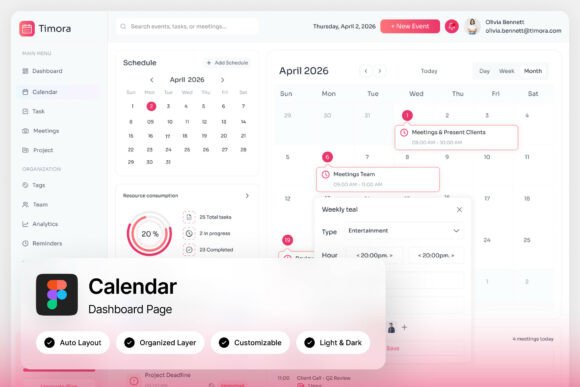
Most calendar interfaces are purely utilitarian, focusing solely on data density. They cram in as many events as possible, often sacrificing readability and user experience. Timora takes a different approach. Its layout uses a soft pink-gradient and white palette that feels inviting and modern without being distracting. The design intelligently separates different types of information—monthly overviews, detailed event cards, visual task timelines, and concise appointment summaries—so your eye knows exactly where to go. This isn't just about looking pretty; it's about reducing cognitive load. When your dashboard is well-structured, you spend less time searching and more time doing.
For developers and product teams, this approach solves a common problem: how to create a scheduling tool that users actually enjoy using. The pixel-perfect layout and organized layers mean you're not starting from scratch. You're building upon a foundation that already understands balance and hierarchy. Whether you're crafting a niche project management app or a broad productivity suite, the clarity of this design language helps users feel in control of their time, which is the core promise of any good calendar tool.
From UI Kit to Real-World Application: Who Benefits?
The true value of a resource like the Timora Calendar Dashboard is seen in its application. It’s a versatile starting point for a wide range of projects. A SaaS team building a new client booking platform can use its structure to present availability, upcoming appointments, and meeting summaries in a client-facing portal that feels professional and easy to navigate. For a solo developer creating a personal productivity app, the included light and dark mode interfaces provide a ready-made solution for user preference, a feature that significantly enhances user comfort and accessibility.
Think about the needs of a small business owner using a scheduling plugin for their website. They need an interface that reflects their brand's professionalism. The clean, modern aesthetic of Timora provides that. It transforms a backend administrative tool into a part of the brand experience. Similarly, a marketing agency could adapt the design for an internal editorial calendar, where social media campaigns, blog post deadlines, and email blasts are visualized not as abstract tasks, but as a cohesive, manageable timeline. The design moves beyond mere date tracking to become a true command center for planning.
The Anatomy of an Effective Design Asset
What makes a UI kit like this more than just a pretty mockup? It’s the practical details that save time and ensure consistency. The two high-quality admin dashboard screens at 1440×1024 px resolution give you a realistic working canvas. Every element, from the event cards to the task timelines, is built with well-organized, named, and grouped layers in Figma. This means a designer can easily swap colors, adjust spacing, or modify components without dismantling the entire file. It’s fully customizable, allowing you to infuse your own brand's personality—perhaps by changing the gradient to match your brand colors or adjusting the typography to your preferred premium font.
The inclusion of free Google Fonts is a thoughtful touch. It ensures that the design is immediately executable without additional licensing hurdles. The accompanying Help Guide and Font Links file provide clear instructions, making the onboarding process smooth even for those less familiar with Figma. This consideration for the end-user's workflow is what separates a good design asset from a great one. It’s not just about the final visual; it’s about empowering the creator who will use it.
Integrating Timora's Philosophy into Your Design Projects
While Timora is a specific calendar dashboard, its design principles offer broader lessons for any visual project, especially when considering font pairing and brand identity. The dashboard’s success lies in its balanced typography—likely using a clean, legible sans serif font for UI elements paired with a complementary style for headings. This is a fundamental practice in web design and editorial design.
When selecting a typeface for your own projects, whether for a logo, website, or packaging design, consider the personality it conveys. A modern, geometric sans serif can communicate efficiency and clarity, much like Timora’s interface. A sophisticated serif might lend authority to a consultancy's brand. The key is alignment between the font's character and your project's goals. Always test font pairings in context. How does your chosen heading font look next to your body text on a mobile screen? Does it maintain readability at small sizes? These practical tests are crucial.
Furthermore, think about visual consistency. The unified color palette and spacing system in Timora create a seamless experience. Apply this to your own marketing assets. Ensure your social media graphics, email templates, and website share a cohesive typographic and color language. This builds brand recognition and projects a professional presentation that engages your audience. Whether you're designing an invitation, a poster, or a digital product interface, the principles of clarity, hierarchy, and aesthetic harmony are universal. Resources like Timora serve as excellent case studies in applying these principles effectively.
Ultimately, a tool is only as good as the thought behind it. The Timora Calendar Dashboard exemplifies how a focus on user experience and visual design can elevate a functional application. It provides a tangible blueprint for creating digital environments that are both powerful and pleasant to use, reminding us that great design is, at its heart, about solving human problems with elegance and care.