Alula Brush: A Google Slide Template That Feels Handcrafted
You know the feeling. You open a blank presentation, cursor blinking on slide one, and a wave of creative paralysis hits. You have the ideas, the data, the story, but the visual vehicle to carry it all feels generic, uninspired, or just plain boring. We've all been there, wrestling with rigid templates that fight our content rather than frame it. This is precisely where the right design asset can transform a chore into a genuine creative process, turning your message into a memorable visual experience.
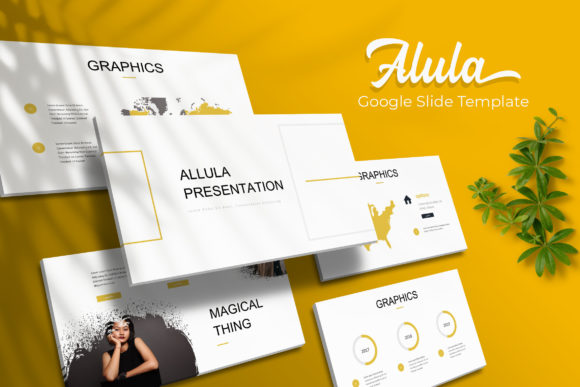
The Alula Brush Google Slide Template is one such asset, built for moments when your project demands more than corporate blues and sterile layouts. It’s a presentation toolkit that embraces a more human, artisanal aesthetic. Think of it as a digital craftsperson’s workshop for your slides, offering a cohesive visual language that feels both modern and warmly approachable. The core appeal lies in its handcrafted infographics and a thoughtful structure that prioritizes visual storytelling over bullet-point monotony.
More Than Just Slides: A Visual System for Your Brand
What makes a template like Alula Brush genuinely useful isn't just its pretty faces—it's the underlying system. With 150+ total slides built on master slides, you're not getting a collection of disjointed pages. You're getting a flexible framework. The five premade color palettes, each with 30 dedicated slides, mean you can instantly adapt the entire presentation's mood to match a specific brand guideline, a seasonal campaign, or a client's preference without manually recoloring every element.
This kind of consistency is gold for anyone building a brand identity. Imagine using the same Alula Brush aesthetic across your investor pitch deck, your Instagram story templates, and your product launch guide. The recognizable style—perhaps the way infographics are drawn or the unique section break slides—becomes a subtle thread of brand recognition. It moves beyond a logo and into the realm of a cohesive visual experience, which is critical for audience engagement and professional presentation.
Practical Magic: Where This Template Shines
The true test of any design asset is its real-world application. The Alula Brush template’s handcrafted style makes it surprisingly versatile for projects that need a personal touch or a creative edge.
- For Entrepreneurs & Small Businesses: Use the portfolio and gallery slides to showcase handmade products, artisan services, or boutique hospitality offerings. The editable graphic placeholders make it simple to drag and drop your own product photography, creating a lookbook or pitch that feels curated, not mass-produced.
- For Marketers & Content Creators: Transform a standard social media strategy into an engaging visual narrative. The section break slides are perfect for introducing new topics in a webinar or online course, maintaining visual interest and pacing. The pixel-perfect illustrations can help explain complex ideas in blog post graphics or email newsletter headers.
- For Designers & Agencies: This is a fantastic base for client work in lifestyle, wellness, food, or craft industries. It provides a strong stylistic starting point that you can then customize, saving hours of initial layout time. The included readme file and font links ensure you can replicate the exact look for client delivery.
Think about packaging design presentations, where you need to evoke a certain texture or feeling. Or a community workshop invitation that should feel welcoming, not corporate. The resizable and editable graphics allow you to scale elements for different formats, from a widescreen presentation to a square social media post, maintaining visual integrity.
Making It Your Own: Tips for Effective Customization
Getting a premium font or a slide template is the first step; using it effectively is where the magic happens. Here’s how to approach a toolkit like Alula Brush to ensure it serves your project goals, not just your immediate slide count.
Start with the Story, Not the Style. Before you even open the file, outline your key messages. What is the single most important takeaway for your audience? Let that narrative guide which of the 150+ slides you actually use. A powerful presentation often uses fewer, more impactful slides than a bloated one.
Test Font Pairings Thoughtfully. The template comes with free font links, likely suggesting a primary display font and a complementary sans-serif or serif for body text. While the Alula Brush style itself is a feature, ensure your chosen pairing maintains readability, especially for dense text. A beautiful script font is useless if your audience can't decipher the details of your pricing table.
Leverage the Master Slides. This is the most underutilized feature in any template. Editing the master slide allows you to change global elements like background colors, logo placement, or footer styles across every single slide instantly. It’s the key to enforcing that visual consistency you’re after and saving yourself from tedious manual edits later.
Remember the Commercial Licensing. Always review the readme file first. Understanding what you can and cannot do with the template for commercial projects is crucial. This is especially important if you're creating assets for a client or for resale, like a digital product or a merchandise line.
A Tool, Not a Crutch
Ultimately, the Alula Brush Google Slide Template is a sophisticated starting point. It hands you a beautifully crafted set of tools—the color palettes, the slide structures, the infographic styles—but the story you build with them is uniquely yours. It’s for the designer who values aesthetics, the entrepreneur who needs to communicate personality, and the marketer who believes that how you say something is as important as what you say. In a sea of identical slide decks, choosing an asset with a distinct, handcrafted character might just be the detail that makes your message stick.