Transform Your Presentations with Clothie Google Slides
Imagine opening a presentation software and having a fully formed, visually stunning deck ready for your content. No more staring at blank slides or wrestling with clunky design tools. The Clothie Google Slide Template offers exactly that—a comprehensive, professionally designed foundation for anyone who needs to communicate ideas with clarity and style. With over 150 total slides across five premade color schemes, this template package is built for real-world use, whether you're pitching to clients, teaching a workshop, or sharing a portfolio.
A Foundation Built on Thoughtful Design
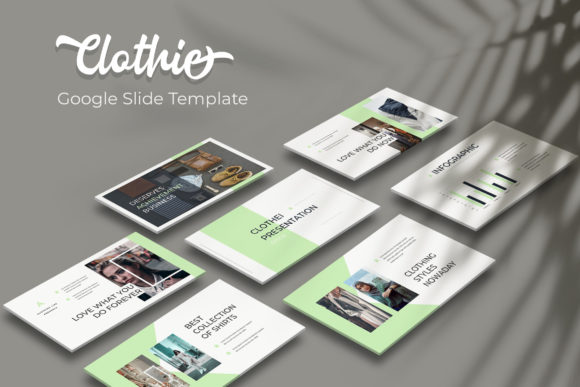
What sets Clothie apart isn't just the quantity of slides—it's the intention behind every layout. Each of the five color variations contains 30 meticulously crafted slides, giving you enough structure to build a cohesive narrative without feeling repetitive. The color palettes themselves range from muted and professional to vibrant and energetic, so you can match the template to your brand's personality or the mood of your presentation. This isn't a one-size-fits-all solution; it's a toolkit designed to adapt to different contexts.
The handcrafted infographics deserve special attention. Rather than generic charts and diagrams, these visual elements feel designed with purpose. You'll find data visualization slides that actually help audiences understand complex information, timeline layouts that tell a story, and process diagrams that simplify workflows. For small business owners presenting quarterly results or marketers pitching campaign strategies, these infographics save hours of manual design work while maintaining a polished, professional appearance.
Practical Features That Save Time
One of the most frustrating aspects of working with presentation templates is the rigidity. Clothie addresses this with resizable and editable graphics and picture placeholders that support drag-and-drop functionality. If you've ever struggled to fit an image into a predetermined space or spent twenty minutes adjusting a graphic's proportions, you'll appreciate how seamlessly these elements work. The master slide architecture means that changes made to the foundational design ripple through the entire deck, keeping your visual language consistent from the first slide to the last.
Pixel-perfect illustrations ensure that every visual element appears crisp and intentional, whether you're projecting on a conference room screen or sharing your deck digitally. This attention to detail matters more than most people realize. Audiences might not consciously notice perfectly aligned elements or consistent spacing, but they absolutely notice when something feels off. Clothie eliminates that subconscious friction, allowing your content to take center stage.
Beyond Presentations: Versatile Design Applications
While the name suggests a presentation tool, the Clothie template's design assets extend far beyond slide decks. The section break slides work beautifully as standalone graphics for social media posts. The portfolio layouts can be repurposed for digital lookbooks or product catalogs. The clean typography and balanced compositions translate naturally to other brand touchpoints.
Consider using these slides as a starting point for brand identity exploration. The five color variations offer a practical way to test how different palettes feel across consistent layouts before committing to a full brand system. For entrepreneurs in the early stages of building their visual identity, this kind of experimentation is invaluable. You can present the same content in five different moods and get feedback from colleagues or clients before investing in custom design work.
Marketing professionals will find particular value in the template's structure. The slide layouts anticipate the kinds of content marketing teams actually need: comparison slides for competitive analysis, quote slides for testimonials, image-heavy slides for product showcases, and text-focused slides for key messages. Rather than forcing your content into a generic template, Clothie provides frameworks that align with common communication goals.
What's Actually Included in the Package
The download contains five PPTX files in widescreen format, each corresponding to one of the premade color schemes. A readme file walks you through setup, and the font used in the design is available as a free download—the link is included in the documentation. This is a thoughtful detail that prevents the common frustration of opening a template only to find that the typography doesn't render as intended because you're missing a specific typeface.
It's worth noting that the photographs and images shown in the preview are not included in the download. They're there to illustrate how the slides look when populated with content, but you'll need to supply your own visuals. This is standard practice with design templates and actually works in your favor—it means the final presentation will feature your own imagery, reinforcing your brand rather than relying on stock photography that others might use.
Making the Most of Your Template Investment
Getting real value from any design template requires a bit of strategy. Start by selecting the color variation that best aligns with your brand or the specific presentation's purpose. Don't default to your favorite color—think about what will resonate with your audience and what context the presentation will be viewed in. A pitch to potential investors might call for the more restrained palette, while a creative workshop could benefit from something bolder.
Next, resist the urge to use every slide. A 30-slide deck is a generous offering, but your presentation might only need twelve or fifteen slides to communicate effectively. Curate ruthlessly. The template gives you options; your job is to select the ones that serve your specific narrative. This selective approach actually makes the template more valuable over time, because you'll discover different slide combinations for different purposes.
Pay attention to the typography hierarchy built into the master slides. The heading sizes, body text proportions, and spacing relationships are designed to guide the viewer's eye naturally. When you add your own content, try to maintain these relationships rather than overriding them with custom formatting. The visual rhythm of a well-structured presentation helps audiences follow your logic and retain information more effectively.
A Resource Worth Keeping in Your Toolkit
Good design assets are the ones you return to repeatedly, and Clothie earns that place through sheer practicality. The combination of variety, customization flexibility, and professional execution means this template can serve you across dozens of projects before you need to look for something new. Whether you're building a brand from scratch, refining an existing visual identity, or simply need to deliver a presentation that doesn't look like everyone else's, having a reliable, well-designed template like Clothie in your collection removes one significant variable from the creative process—and that's genuinely useful.