Designing with the Calendar 2022 Vertical Layout
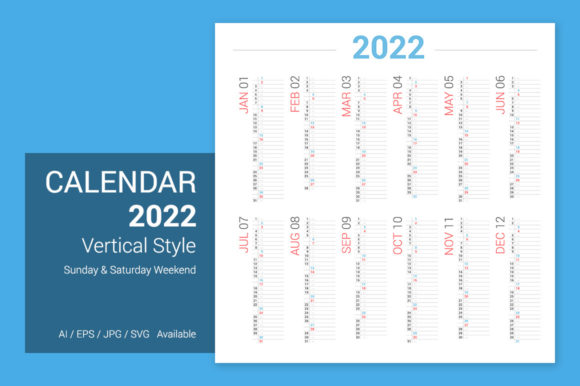
Finding the right visual framework for a project often feels like looking for a needle in a haystack, but occasionally, a specific asset comes along that solves multiple problems at once. The Calendar 2022 Vertical Design is one of those versatile resources that goes far beyond its basic function of tracking dates. With its specific dimensions of 3000 x 3000 pixels (or 53 x 53 cm), this asset offers a unique square canvas that lends itself perfectly to modern digital requirements while maintaining the structure needed for print. It is not just a grid for marking appointments; it is a comprehensive design toolkit ready for customization.
When you first look at this resource, you will notice the clean integration of the Roboto font. As a quintessential sans serif font, Roboto is known for its mechanical skeleton and largely geometric forms. It provides a friendly and approachable aesthetic without sacrificing the precision required for a calendar layout. Because the file formats include .AI and .EPS, the typography is not set in stone. This is a crucial feature for anyone working in branding or editorial design. If you are building a brand identity that requires a more traditional look, you can easily swap out the modern typography for a serif font. Conversely, if the project calls for a more personal touch, replacing the default text with a script font or handwritten font can instantly change the mood of the entire piece.
Practical Applications for the Modern Creator
The utility of the Calendar 2022 Vertical Design extends into various creative industries. For the small business owner, this asset is invaluable for creating annual planners that can be sold as digital products or physical merchandise. The square 21" x 21" format is particularly interesting for packaging design. Imagine a flat box lid or a folded poster insert; the vertical layout guides the eye naturally downward, making it easy for customers to scan through the year.
For content creators and marketers, the high-resolution JPG files are perfect for social media graphics. Instagram and Pinterest favor square or vertical formats, and this design fits those constraints perfectly. You can use the calendar as a background for monthly announcements, sale dates, or event schedules. By utilizing the editable AI files, you can ensure that the visual consistency of your feed remains intact, matching the calendar’s colors and typeface to your existing brand identity.
- Wall Art & Posters: The 53 x 53 cm size makes this ideal for high-quality posters. It serves as functional art for home offices or studios.
- Client Gifts: Agencies can customize the design with client branding to create thoughtful, professional gifts that keep their logo visible all year.
- Website Banners: Web designers can adapt sections of the calendar for web design headers, specifically for "Coming Soon" pages or annual retrospective blog posts.
- Invitations: While usually for events, a "Save the Date" for a year-long series or a workshop schedule can utilize this vertical grid effectively.
Typography and Readability in Grid Layouts
One of the most significant challenges in calendar design is readability. A calendar must be functional above all else; if a user cannot quickly distinguish between Tuesday and Wednesday, the design has failed. The choice to start with Roboto is smart because it is a highly legible typeface, even at smaller sizes. However, if you decide to change the font, you must prioritize clarity.
When testing font pairings, consider the hierarchy of information. The month names should command attention—a bold display font or a heavy weight of a sans serif works well here. The dates themselves, however, require a lighter touch. Avoid overly ornate scripts for the numbers, as they can become illegible when printed or viewed on a mobile screen. A clean, geometric sans serif or a modern serif ensures that the information remains accessible.
Furthermore, the spacing in the vertical layout is designed to accommodate the weekend schedule. Saturday and Sunday are often highlighted in creative calendars, perhaps using a different color or a distinct font weight. This helps in audience engagement, allowing users to visually separate their work week from their leisure time. This small detail improves the professional presentation of the final product, whether it is a printed planner or a digital screensaver.
Leveraging File Formats for Maximum Flexibility
The inclusion of multiple file formats (.AI, .EPS, .JPG) makes this a premium font asset package, even though it is a complete design template. The vector capabilities of the .AI and .EPS files mean you can scale the design infinitely without losing quality. This is essential for packaging design or large-scale printing where pixelation is unacceptable.
For those who are not deep into vector editing, the JPG files offer a quick solution for digital use. However, the real value lies in the editable nature of the Adobe Illustrator files. Being able to manipulate the grid, adjust the kerning of the numbers, or even change the background texture allows for infinite customization. This flexibility supports the creation of unique design assets that do not look like generic templates downloaded from the internet.
It is also worth noting the commercial licensing implications. When using templates like this for client work or merchandise, always verify the license. A robust license allows you to create physical goods for sale or digital downloads without legal worry, providing peace of mind for the creative entrepreneur.
Aligning Visuals with Project Goals
Before diving into the customization of the Calendar 2022 Vertical Design, take a moment to define the goal of the project. Is the calendar meant to be a corporate gift? If so, stick to the clean lines of the Roboto font or switch to a similar professional sans serif font that aligns with corporate identity guidelines. Is it for a creative workshop or a yoga studio? In that case, integrating a handwritten font or a soft script font can evoke a sense of calm and personal connection.
The vertical orientation naturally draws the eye down, mimicking the flow of a list. This makes it excellent for to-do lists or goal-tracking planners integrated into the calendar design. By understanding how the human eye moves across a page, you can place key branding elements—like a logo or a slogan—at the top or bottom anchors of the vertical square, ensuring they are seen without cluttering the functional date grid.
Ultimately, this design is a foundation. It provides the structure—high resolution, correct dimensions, and a solid typographic starting point—but the creativity is left to you. Whether you are designing a wall calendar for a local business, creating a marketing asset for a social media campaign, or crafting a personal planner, the versatility of this file ensures a polished, professional result that respects both form and function.